
This article describes the new features, improvements and fixes included in this release of SystemWeaver. When upgrading, we recommend that all client and server applications be upgraded as some bug fixes and/or enhancements require this.
These release notes are also available as a MS Word document, as well as a SystemWeaver XML file. Both are attached at the bottom of the article. You can also print out this article as a PDF using the Print option.
Note: Special attention should be given to the items highlighted in yellow as they will require additional planning/steps for your organization pre and/or post-upgrade if the view/tool affected is being used in your installation. |
Improvements and New Features
| Highlights | Breaking Changes* |
* Necessary and/or potentially breaking changes
Administrators
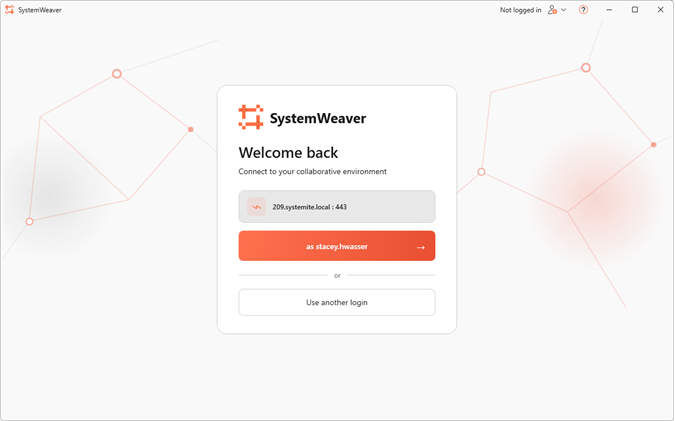
Admin/Architect client: New style for initial login page |
The SystemWeaver Admin and Architect client has a new, modern look for the initial landing page.
|
23744 |
Admin/Architect client: Support for startup argument |
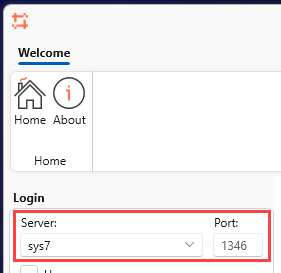
Command-line argument support is now available in the SystemWeaver Admin and Architect clients. This functionality was missing from the initial releases of the new client. The currently supported command-line options are listed below: --serverName <serverName> The name or IP address of the SystemWeaver server --serverPort <serverPort> The port number of the SystemWeaver server --loginName <loginName> The username that will be set in the client -?, -h, --help Show help and usage information Example: "C:\SystemWeaver\Client\SystemWeaver.exe" --serverName=sys7 --serverPort=1346
|
24470, 24213 |
Admin: Introduction of new role |
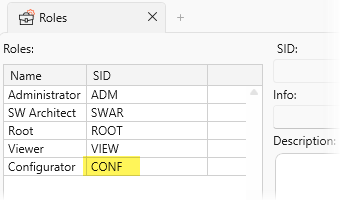
As part of the ongoing improvements to Role-Based Access Control (RBAC), a new role with SID CONF has been introduced in SystemWeaver. This is a breaking change if your organization already uses the SID CONF for an existing role. In that case, you must assign a different SID to that role to avoid a conflict when this new role is enabled. More details to follow in a later release of the client.
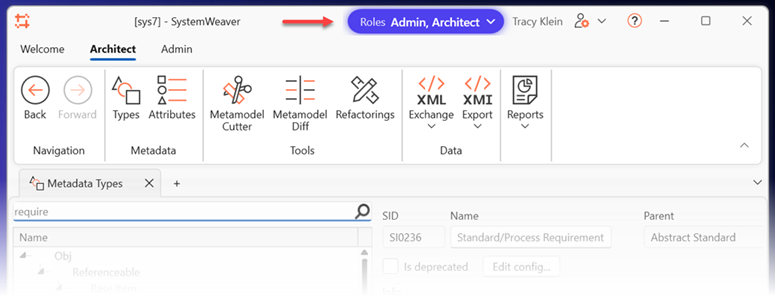
In addition, Administrators and Architects will now see a Roles selector that displays their assigned roles in the server. If a user has both roles, they can hide the tab associated with either role by deselecting it in the drop-down list.
|
24701, 24941 |
AI Product licensing |
With this release, the AI products require license add-ons.
Add-on access takes effect immediately when users are assigned the appropriate license key. No server restart is required. Contact SystemWeaver Support to obtain either or both add-ons. Both add-ons are complimentary for the R53 release. |
API/Rest API/Extensions API Users
API: Major version update |
| The SystemWeaver API has been upgraded from version 1.54 to version 1.55. This is a major version update. As a result, all users will need to install and use the R53 version of the client applications. In addition, any internally developed applications that use the SystemWeaver API must be recompiled using the updated SystemWeaverClientAPI.dll. This is a breaking change. Applications compiled against the previous version of the API will not be compatible with version 1.55. |
24813 |
API: Support for creating description references |
| You can now create Description References through the SystemWeaver ClientAPI using the new link format: sw://app/object/x04000000001910AD If you create RTF or HTML and include hyperlinks with the above format, you can now then use the API to convert them to SystemWeaver descriptions, and the links will be converted into actual Description References in SystemWeaver. |
22316 |
C# API: Change to event logging
The C# ClientAPI debug logging has been updated to provide more accurate measurements of server response times. The Return buffer size log entry is now written before event processing, preventing the time spent executing client-side events from being incorrectly attributed to server latency.
Additionally, the time taken to execute events is now logged separately, making it easier to distinguish server response times from client-side processing delays.
Note: This change generates additional debug log entries, particularly when the client is processing a high volume of events.
Example of the previous logging:
Could give the misleading impression that the server was experiencing latency or problem:
2026-09-09 23:58:07.0021 [DEBUG] TswClientTCPMarshaler: Calling Server Item_GetNextVersions, 24
2026-09-09 23:58:07.0162 [DEBUG] TswClientMarshaler: Return buffer size: 10
Example of the logging now:
2026-09-10 00:00:42.0740 [DEBUG] TswClientTCPMarshaler: Calling Server Object_SetName, 151
2026-09-10 00:00:42.0906 [DEBUG] TswClientMarshaler: Return buffer size: 0
2026-09-10 00:00:42.1048 [DEBUG] TswClientMarshaler: DoEvents: 2 events in 10,304 ms
2026-09-10 00:00:42.4119 [DEBUG] TswClientTCPMarshaler: Calling Server Object_SetName, 149
2026-09-10 00:00:42.4283 [DEBUG] TswClientMarshaler: Return buffer size: 0
2026-09-10 00:00:42.4283 [DEBUG] TswClientMarshaler: DoEvents: 2 events in 0,243 ms
24614
REST API: Entra ID Token/Client certificate based auth |
This release includes support for Entra ID authentication with our REST API. curl --insecure -X POST http://127.0.01:9000/token -d "entraauthentication=true&grant_type=password&id_token=[entra_id_token]" The Entra ID token can be obtained from your organization. |
22875, 23039 |
REST API: Token timeout is random and not correct |
The REST API uses two tokens with separate timeouts: an access token, valid for 2 minutes, and a refresh token, valid for 10 minutes. Previously, the token lifetimes could vary randomly by an additional 0–16 minutes. Now, both tokens consistently expire after their configured set times. New feature: Token expiration times are now configurable through appsettings.json, allowing the validity periods to be adjusted to meet specific requirements. { "SystemWeaver": { "restApiBaseURL": "localhost", "restApiPort": 9000, "requireHttps": false, "certificateSubjectName": "localhost", "systemWeaverHost": "localhost", "systemWeaverPort": 8888, "allowHttp2": true, "DomainName": "SYSTEMITE" }, "Tokens": { "Key": "0123456789ABCDEFX", "Issuer": "http://systemite.se", "Audience": "http://systemite.se", "AccessTokenValidTimeSeconds": "120", "RefreshTokenValidTimeSeconds": "600" ... } |
21692 |
Architects
XML Export/Import: Updated version |
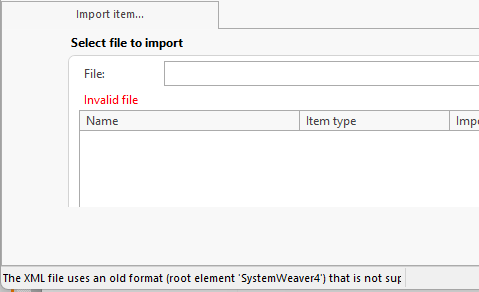
This release includes an updated version of XML Export and Import to support the new Description References. The XML schema itself remains unchanged. Important: XML exports and imports must now be performed using the R53 clients or standalone tools, such as swXmlExport. Although the XML schema is unchanged, the updated Description format introduces a compatibility requirement. XML files exported using earlier client versions are not compatible with the updated Description format. Attempting to import such files will result in an "Invalid file" message and the following log entry: The XML file uses an old format (root element 'SystemWeaver4') that is not supported by this version. Re-export the file from a SystemWeaver version that matches this one.
The resolution is to re-export the data using an R53 client or export tool before importing it. Impact on XML Data Exchange Between Organizations: This change may be a breaking change for organizations that exchange XML data. If one organization upgrades to R53 while the other continues using an earlier version, XML data exchange between them will no longer be supported. Both organizations must upgrade to R53 to continue exchanging XML data. |
24943 |
Architect: Attribute type description refresh |
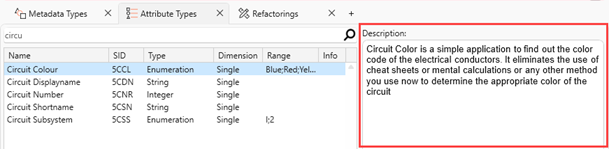
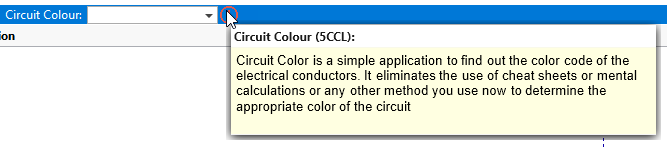
Now, when you update an Attribute type Description in the Architect, the change will appear immediately without having to refresh the page.
This information is available to users upon Alt+Click on an attribute:
|
23916 |
swExport: Introduction of generated XML export |
The swExport tool now supports exporting generated XML, providing the same functionality as the configurable XMLs view in the client. This enables you to implement custom export solutions tailored to your organization's needs. The export functionality has no required meta model, or item structure. It is suitable for all generated XML use cases, such as .reqIF exports. Since swExport also supports Document exports and configurable Grid, Graph, and Report exports, you must set the type attribute to "xml" when exporting generated XML. See the executable's Help for information about options. Example Command Lines: Using Username and Password: swExport serverName=sys7 serverPort=1344 serverUsername=john serverPassword=password itemID=x040000000011A242 type="xml" configItem=x34000000001DFB9B filename="C:\Work\Specification document(1).reqif" Using Network Authentication: swExport serverName=sys7 serverPort=1344 itemID=x040000000011A242 type="xml" configItem=x34000000001DFB9B filename="C:\Work\Specification document(1).reqif" |
| 22746 |
| Users |
WeaverAI: Various improvements |
The following highlights of improvements and new capabilities have been introduced in WeaverAI since the previous release.
Help and Chat Management
- Offline SystemWeaver Help: A searchable help plugin provides access to SystemWeaver Help documentation and is built for each release.
- Local chat history: AIHost now stores chat history locally for the current Windows user instead of keeping it in memory.
- Context management: Previous chat contexts are preserved, allowing users to start new chats without losing access to earlier conversations.
- Parallel requests: Multiple AI chats can process requests concurrently. A status indicator shows when a chat is active.
- Automatic chat naming: Chat names are generated based on the first interaction and can still be edited manually.
AI Provider Support
- Consolidated AI provider configuration: Support for Ollama and LM Studio has been removed as separate integrations. The OpenAI plugin now covers these use cases and supports multiple instances, providing greater flexibility when configuring AI connections.
Improved AI Tooling
The SystemWeaver tools available to AI have been improved to provide clearer interfaces, more reliable operations, and broader coverage.
- Cleaner tool interfaces: Tool names are more consistent, and tools are grouped into capability areas that the host can enable or disable individually. Retired tools have been removed, and descriptions have been improved to help the AI select the appropriate tool on its first attempt.
- More precise data retrieval: Callers can request only the fields and attributes they need. Attributes are identified by SID, result sizes are bounded, and truncated results report both the truncation and the true result length.
- Richer descriptions: Descriptions can be read and written as HTML while preserving references to other items. Pictures are retained during updates, and all pictures displayed in a description can be listed and retrieved as files.
- Improved traceability navigation: Reference parts and traceability links are reported during navigation and can also be created. Failed lookups are distinguished from cases where an item does not exist.
- Broader tool coverage: Support now includes issues, notes, and attachments on any object, application configuration, configurable views, and item version history.
AI Identity and Auditability
- Dedicated AI User: AIHost connects to SystemWeaver using a dedicated AI User account. This allows the AI's permissions to be configured independently of individual users and makes AI-driven changes distinguishable from changes made by people. The AI operates through its own connection and never impersonates the person using the chat client. The chat client only specifies which tools are active; AIHost executes the SystemWeaver tools using the AI User's connection.
Performance and Efficiency
- Faster sw_walk execution: Processing more than 1,800 children has been reduced from 98 seconds to approximately 2 seconds.
- Faster part lookups: Part lookups are significantly faster, helping prevent timeouts.
- Prompt caching: Prompt caching is now supported for Claude and GPT, improving efficiency and reducing repeated prompt-processing overhead.
Configuration Changes
- Configuration update required. The appsettings.json and plugin setting.json files must be updated to accommodate the changes introduced in this release. Review and update the configuration as part of the upgrade process. This is a breaking change.
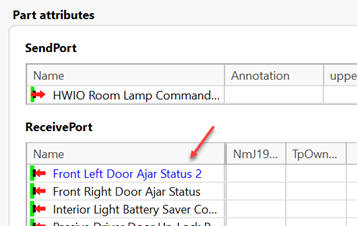
Attributes: Part names shown in blue |
Parts with part names now display the names in blue in the Part attributes grids.
|
24507 |
Attributes: Support for copy item in part attributes grid |
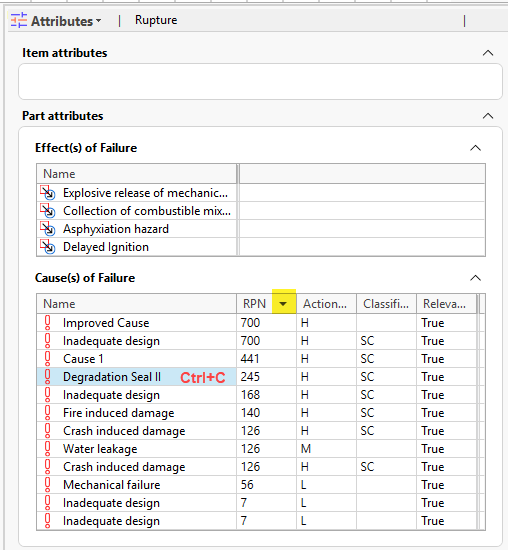
The Part Attributes grid now supports copying selected items to the clipboard using Ctrl+C and sorting the grid by part attribute values.
|
Change log: Template display |
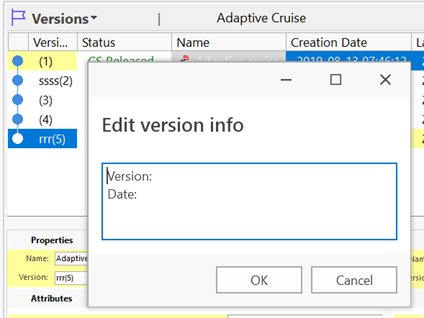
If a Change log template is configured, it will now always display when the change log is empty. This is the case even after clearing a Change log entry.
What is a Change log template? An option for Item Type Configuration called ChangeLogTemplate. It supports presenting a template to users for Version change Log entries. Example: <ItemTypeConfig> <ChangeLogTemplate name=""> Version: Date: </ChangeLogTemplate> </ItemTypeConfig> |
24360 |
Clone item: Support for clone with signature attribute |
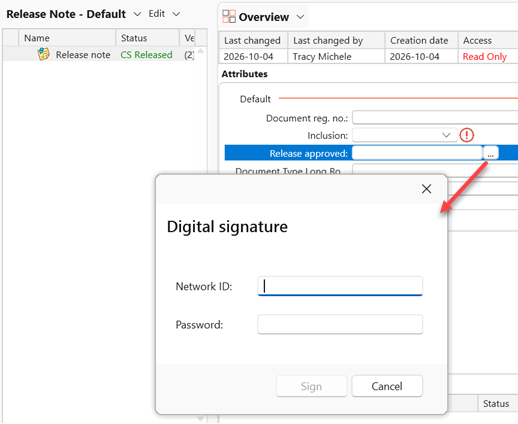
Using the Clone item view, it is now possible to clone items that have Signature attribute(s). The resulting clone will not have a value set in the attribute. What's a Signature attribute? The Signature type attribute provides a means of electronically signing an item. The signing attaches a block of identification data to the item that you sign.
|
19714 |
Complete status: Immediate refresh |
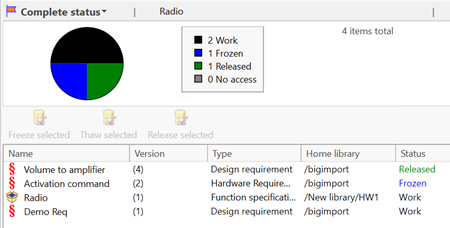
Changes made to Type and Home library are now also immediately reflected in this view in other clients.
|
Description: Updated description reference links |
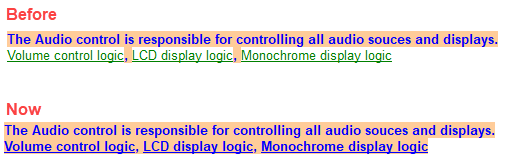
With this release, Item and Part reference links in Item Descriptions are now represented as standard hyperlinks, replacing the previous special link format. This change lays the foundation for greater flexibility and additional link options in future releases.
Users should notice no difference in functionality. However, since these links are now standard hyperlinks, they can be styled using regular formatting.
|
24829 |

Graphs component upgrade
The graph component used in the following views has been upgraded from version 3.6 to 4.0. This upgrade improves diagram interactions and layout capabilities while providing a more modern foundation for future enhancements and new features.
The upgrade affects the following views:
- Configurable Graphs (built-in view)
- SWExtension.MetaModelGraphs (extension view)
- SWExtension.ComponentGraph (extension view)
As a result of the upgrade, automatically generated layouts may look different compared to earlier releases. In many cases, the new layouts provide improved node positioning and fewer edge crossings, making diagrams easier to read and understand.
Tip: To ensure you see the updated layouts for configurable Graphs that you typically load (cached to your computer), you navigate to C:\Users\YOURUSER\AppData\Local\Systemite\SystemWeaver\3.0\0, and delete any cached graph files found in this folder. The files are zip files similar to the below example. This will force the system to regenerate the graphs.
24129, 23268
Issues editor: Display of IDs with multi-select |
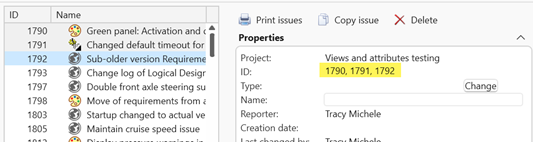
When multi-selecting Issues in the Issues view and in a Project, the Issue IDs for all selected issues will now display in the Issue editor.
|
24579 |
Issues: Add note and lost connection |
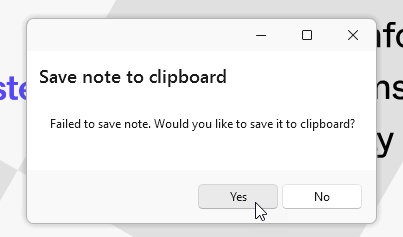
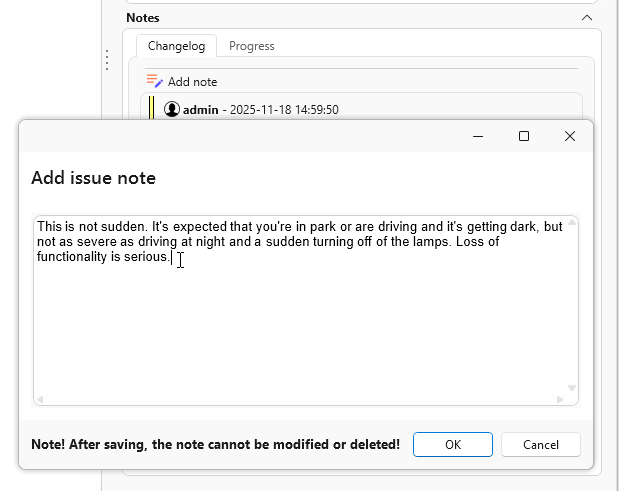
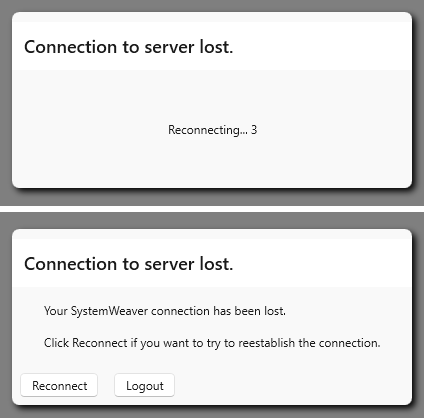
When staging an Issue note and your connection is lost to the server, e.g., VPN or internet down, you will now have an opportunity to save your content to clipboard. In this way, you can paste it in a Note again once your connection is reestablished.
|
Occurrence matrix: Refresh option |
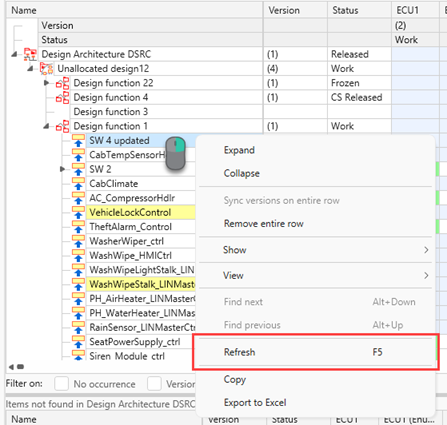
Views that are not real-time collaborative require an explicit refresh action by the user, like switching between views or using the F5 refresh shortcut. The Occurrence matrix view now supports the F5 shortcut as well as a right-click menu option.
|
| 23139 |
Paste special: New search tool |
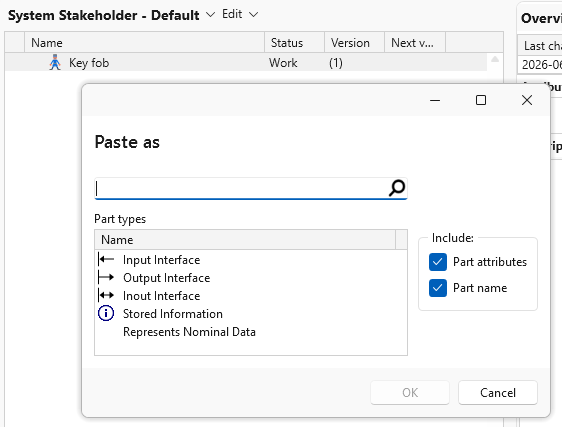
The Paste Special option in the Structure tree now includes a search tool. When the dialog opens, you can simply use the keyboard to search for the desired part type and press Enter to select it and apply. Arrow keys can also be used.
|
Printing: Option to print with watermark |
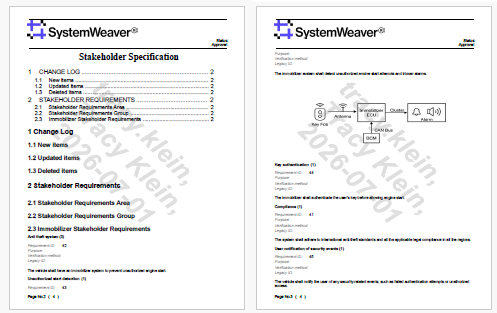
The initial* version of a Watermark option for printing Reports and Documents to PDF is now available. To enable this feature, a SystemWeaver Administrator must enable "Watermark" in Capabilities in the Admin utility. Supported values are string or path query. The value must return true or false. Examples: <Capabilities> <Capability name="Watermark" test="true"/> </Capabilities> < !--Using Path Query: --/> <Capabilities> <Capability name="Watermark" test="CurrentUser = Owner or CurrentUser.Name = 'admin'"/> </Capabilities> When enabled, the Watermark capability enforces watermarking for all Print to PDF with bookmark print jobs and disables the print options that do not include bookmarks (i.e., the Print button). When the Watermark capability is not enabled, both Print with bookmarks and Print without bookmarks options remain available, as before. The current watermark is hard-coded to include: Username, Name, Date of Print to PDF
For more information, see Restricting Standard Capabilities and Example Watermark Capability Configurations * This is a first version. Additional updates may come in later releases |
24178, 24069, 13926, 13389 |
Printing: Improved error handling for PDF bookmark case |
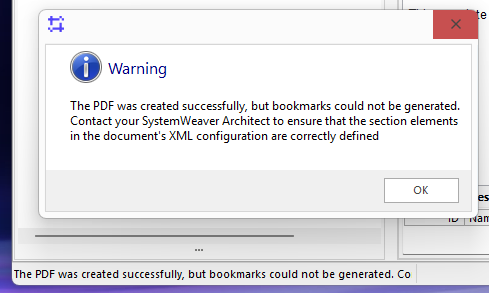
In cases where a PDF with bookmarks does not generate due to a problem in the Document's XML configuration, users will now receive a message "The PDF was created successfully, but bookmarks could not be generated. Contact your SystemWeaver Architect to ensure that the section elements in the document's XML configuration are correctly defined." and the print job will be completed without bookmarks.
|
24197 |
Reconnect behavior for Entra ID |
Following the introduction of Entra ID authentication in a recent release, we have now improved the Reconnect behavior in the Admin/Architect client.
|
23790 |
Server: Faster searches |
We sped up General search and Search in project in several ways:
|
24666 |
IT Administrators
Server upgrade and overall benefits |
If you have yet to upgrade to the next-generation server, you'll be doing so with this release. Please review the updated system requirements for the server: https://support.systemweaver.se/en/support/solutions/articles/31000179376-server-application-system-requirements-r53-and-later swServer.ini There are very minor changes to the server configuration file. You can either: 1) Keep your existing swServer.ini and make the minor changes described below or 2) Use the provided swServer.ini.example included in the Server directory and replace the example settings there with the settings from your existing swServer.ini. New [General] section There is a new section called [General] which is required. It contains swServer log settings. Assuming you have server logging turned on today (using the swServer.props file) and want to continue to generate a Server log (which we recommend), you would need to set the log setting here in the swServer.ini. See the example file provided in the swServer.ini.example. The settings are self-explanatory. In the [MainServer] section, it is unchanged. Just make sure these two lines are commented out using ; symbol if you are using an older swServer.ini ;CallLogging=on/detailed ;LogFileDirectory= In the [Tcp] section, it is unchanged. Just make sure that this line is commented out using ; symbol if you are using an older swServer.ini ;DLS=True/False Monitor Service: Because the swServer log configuration is now set in the swServer.ini, you will no longer need the swServer.props configuration file. You can remove the <props> line from the <Server> in the swServerMonitorService.settings file since the next-gen server does not use the swServer.props. Example swServerMonitorService.settings file - remove the entry shown in yellow below and save your change: The overall benefits of the server upgrade are: Smoother work when many people use it at once
It's faster in so many ways
Option to run on Linux
PostgreSQL support
|
Server: Update of database version |
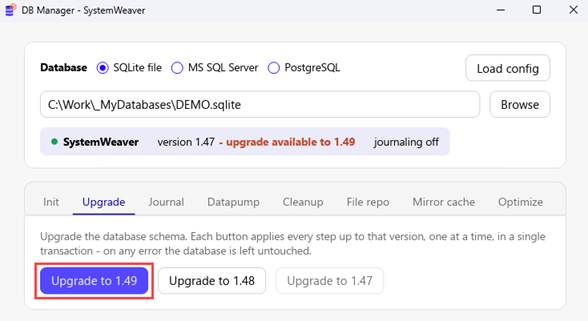
The database version identifies the version of the internal database schema used by SystemWeaver. With Utby (R53), the version has been upgraded from 1.48 to 1.49 due to updates to Description references in the formatted Description. This is a breaking change. System Administrators use the swDatabaseManager to update the database version. See Updating the Database Version.
With the new swDatabaseManager in this release, if you are upgrading from a database version earlier than 1.48, you would simply click the Upgrade to 1.49 button and it will run each database version update automatically. Example upgrade from database version 1.47 to 1.49:
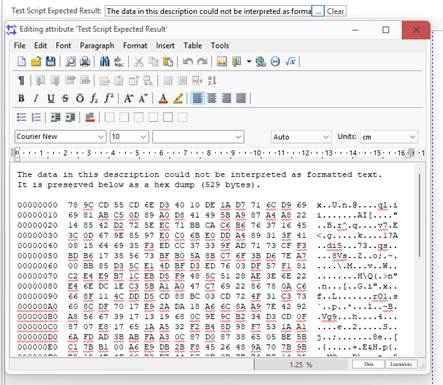
Once the upgrade operation is completed, it will indicate completion and provide a log of the process. The log can be printed to a text file by clicking the Save as button. Note that there may be cases where content was invalid (unreadable "garbage" even by an earlier release), and could not be converted. In such instances, the conversion process will provide information of what the rvf contained, e.g.:
With this information, it's easy to see if it's zip file data or text utf-8/16 and recreate the text. In all likelihood, it is "garbage" data entered for testing purposes that can be ignored. |
.NET Upgrade 8.0 to 10.0 |
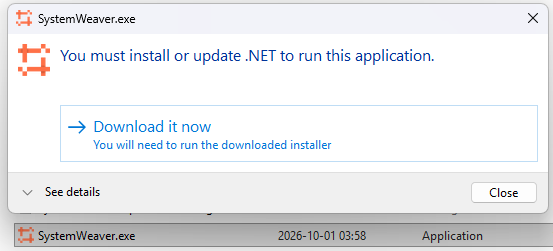
The SystemWeaver Admin and Architect client has been upgraded from .NET 8.0 to .NET 10.0. This upgrade delivers improved performance, security, stability, and compatibility with modern technologies, while providing a stronger foundation for future enhancements and ongoing support. This is a breaking change if .NET 10.0 or compatible version is not installed. Users who do not have .NET 10.0 installed will be prompted to install it when they launch the client.
SystemWeaverClientAPI The SystemWeaverClientAPI will continue to use .NET 8.0 to maintain compatibility and support for all customers. Important Note: The ClientAPI is planned to be upgraded to .NET 10.0 in a future release. |
24681 |
Client: UI and development component upgrade |
In line with our maintenance standards, a UI and application-development component library has been upgraded. The upgrade provides:
|
24685 |
Initial release of SystemWeaver MCP Server | ||||||||||||||||||||||||||||||||||||||||||
Introducing our initial version of the SystemWeaver MCP Server! The SystemWeaver MCP Server connects AI assistants to a SystemWeaver model. It implements the Model Context Protocol (MCP), so any MCP-capable client (for example Claude Desktop or Claude Code) can navigate, read, and — where you allow it — change SystemWeaver content in natural-language conversations. The server runs locally on Windows and talks to your existing SystemWeaver broker over the SystemWeaver ClientAPI. It uses the permissions of the SystemWeaver user it connects as, so the AI assistant can see and do only what that user can. Tool overview The server provides 46 tools, grouped into capability areas ("axes"). Each area can be turned on or off separately. A disabled area is not offered to the AI assistant, and a call to one of its tools is refused.
* All write areas are off unless you turn them on. The example configuration that ships with the server is configured for read-only. Features
Requirements
Known limitations and recommendations
Getting started 1. Run SystemWeaverMCP.CredentialTool.exe, enter the broker connection details, and click Test & Save. 2. Copy appsettings.example.json to appsettings.json next to the server. Turn on the write areas you need. 3. Register the server in the MCP configuration of your AI client. 4. Check the setup with mcp_server_info from the client, or run SystemWeaverMCP --test. See INSTALL.txt in your delivery for the full setup guide. |
Jira: Limited support for integration with Data Center |
As Atlassian is phasing out Jira Data Center and no longer sells Data Center licenses to new customers as of March 30, 2026, please note that our ability to support an integration with Jira Data Center is limited and may require that testing of new features and/or bug fixes be done by the customer until Data Center reaches final end-of-life for those existing customers. We continue to support an integration with Jira Cloud. Not familiar with SystemWeaver's built-in Issue management? Learn more at https://support.systemweaver.se/en/support/solutions/folders/31000115369, or contact us for a demonstration.
|
Jira: Support for filtering projects |
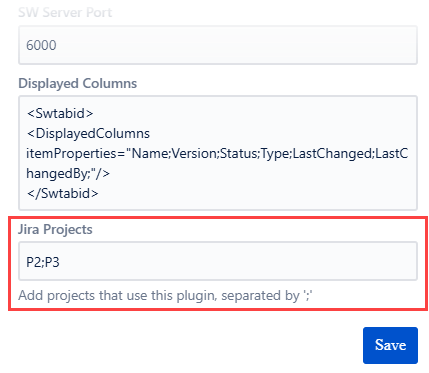
SystemWeaver's integration with Jira now includes an option for specifying which Jira Projects are to be integrated with SystemWeaver. The configuration of the SystemWeaver add-on in Jira includes a new setting called Jira Projects. Here, you include a list of the Jira projects where the SystemWeaver "tab" in Jira will display linked Item information. The SystemWeaver–Jira integration now allows you to specify which Jira projects are integrated with SystemWeaver. A new Jira Projects setting has been added to the SystemWeaver add-on configuration in Jira. Use this setting to specify the Jira projects in which the SystemWeaver tab displays information about linked Items.
|
15894, 23928 |
Server: New swDatabaseManager |
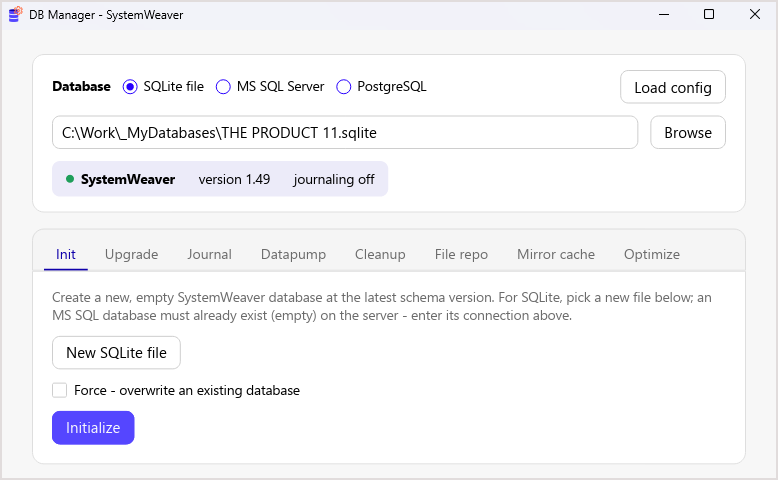
R53 comes with a new Database Manager for the R53 server. It handles the same everyday tasks as the legacy Database Manager, with these improvements:
|
23346 |
Server: Continued Linux improvements |
R52 introduced early-access Linux support. R53 brings more support for running the server as a regular service on Linux.
|
Server: Further improved startup time |
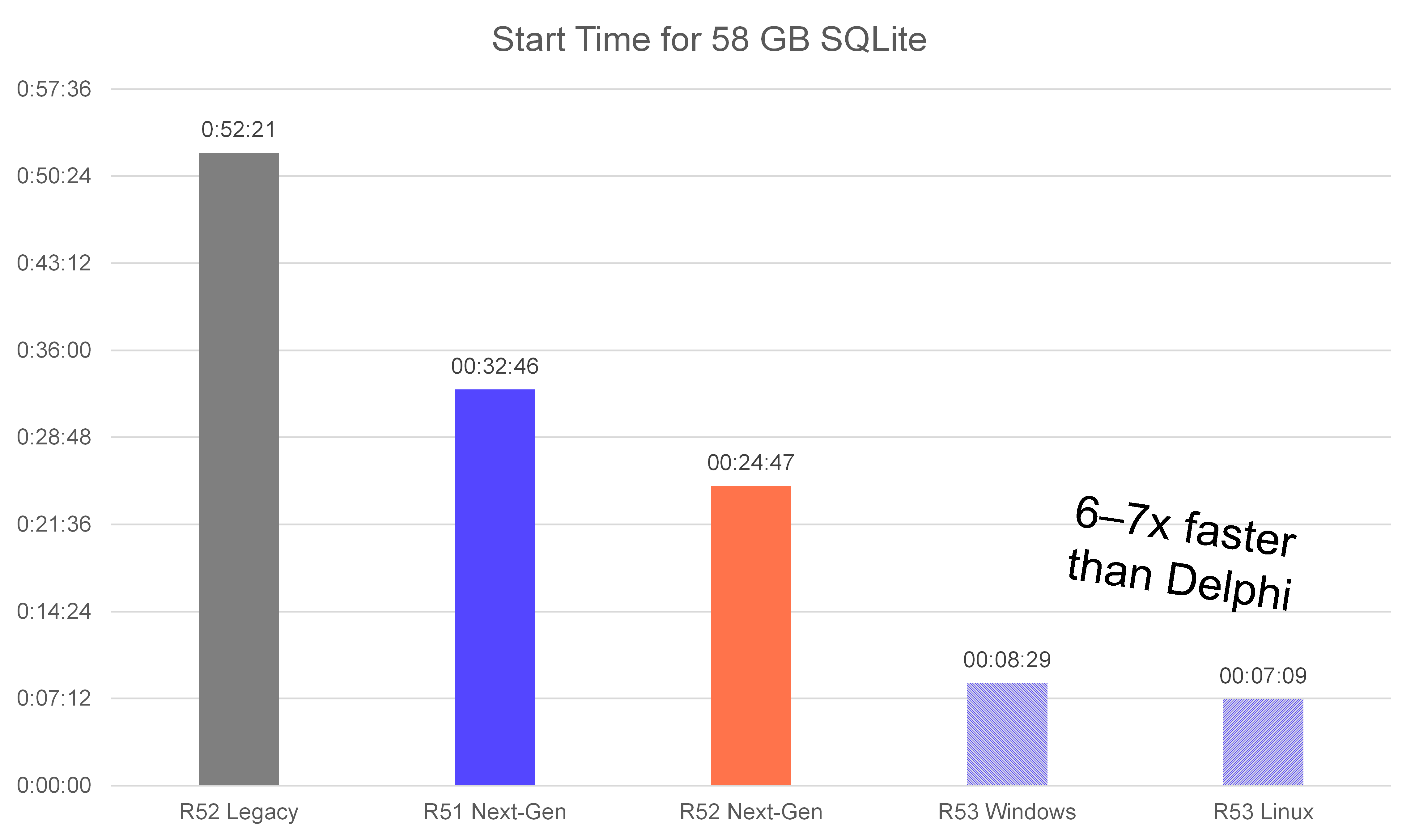
The next-gen server now starts faster, since it does more of its startup work in parallel. On our largest test database, startup went from 24 m 50 s to 8 m 30 s on Windows and to 7 m 10 s on Linux. The cost is slightly higher memory use during startup, but steady state memory use is technically the same as in R52.
|
24361 |
Server: Legacy scheduler removed |
The legacy request scheduler in the TCP subserver was disabled by default in R52, and is completely removed in R53. The scheduler tried to make request handling fairer back when the server had a global reader/writer lock. Since R52, the next-gen server no longer has that lock. |
| 23972 |
Server: Mirror initialization over the network |
A mirror server can set itself up by fetching all data from its main server over the network. In R53, this works better for large databases:
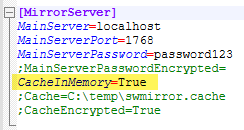
While we continue to recommend using a cache file for mirror servers for production environments, in-memory caching is a good alternative for a test environment or when a persisted copy of the database on disk is undesirable for other reasons. Example swServer.ini for mirror server using in-memory cache:
|
21169 |
Server: Non-blocking writes |
In R52 we removed the global read/write lock so that read calls to the server no longer block a writer.
With R53, the next-gen server can run some writes at the same time as other writes! This brings an overall performance improvement to the server, and greatly alleviates worst-case slowness. How it works: Each write works on its own snapshot of the database, and when it is done, the server checks whether another write that finished in the meantime changed the same objects. If not, the write goes through. If there was a conflict, the server throws away the result and runs the call again on the new state of the database. Two writes can conflict even if they change different objects. For example, if two different users are renamed to the same name at the same time, each write on its own sees that the name is free, but together they break the rule that user names are unique. We went through each call below to find cases like this, and made the server treat them as conflicts too. Together with the write conflict check, this is why data consistency guarantees remain unchanged. These operations now run concurrently with other writes:
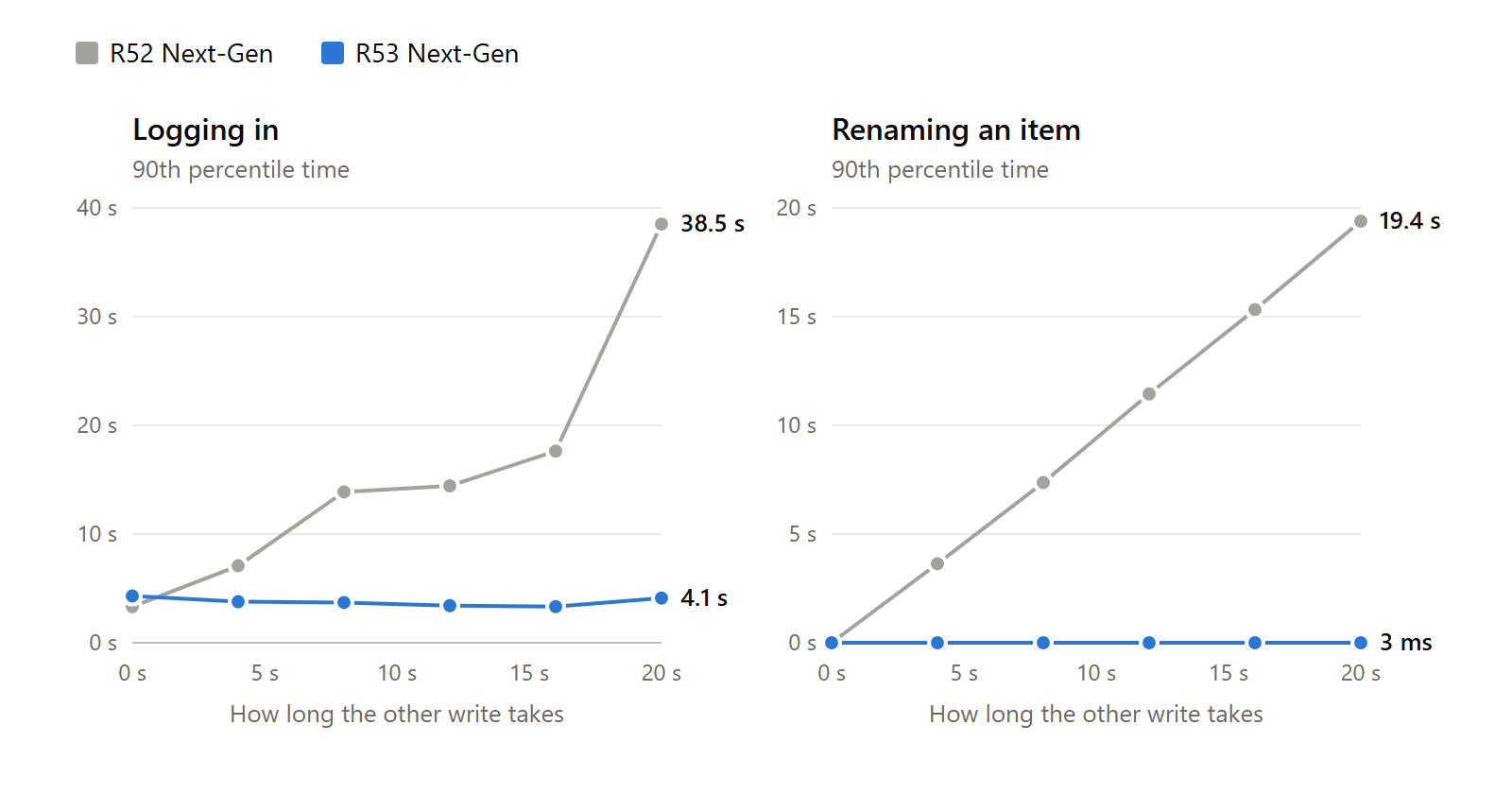
All other writes still run one at a time, as before. We plan to add more calls to this list in coming releases, starting with the most high-impact ones. From the perspective of an API client, like swExplorer.exe, the only difference brought by this change is better performance. To show the difference, we ran a load test where one user keeps running long writes while other users log in and rename items. We repeated it with long writes of different durations, from none at all up to 20 seconds.
The curve shows the time within which 9 in 10 logins and renames finished, on R52 and R53 Next-Gen. With R53, logging in and renaming an item take the same time no matter how long the other write runs. A single, slow write will no longer block users from logging in, reading data, and making certain simple kinds of edits. |
24810, 24567, 24569 |
Server: PostgreSQL support
The next-gen server now supports PostgreSQL as a database backend, alongside SQLite and Microsoft SQL server.
To use it, set dbType=PostgreSQL in swServer.ini, and set DSN to either a connection string such as host=dbhost port=5432 dbname=systemweaver or a URL like postgresql://dbhost:5432/systemweaver.
You can put the user name and password in the DSN, or use DatabaseUser, DatabasePassword, and DatabasePasswordEncrypted like for MS SQL.
To move an existing database to PostgreSQL, use the Datapump in the new Database Manager.
We recommend using PostgresSQL 17 or later, but the server supports version 10 or later.
SQLite is still our strongest recommendation for the database backend. PostgreSQL is a great alternative that also works over the network.
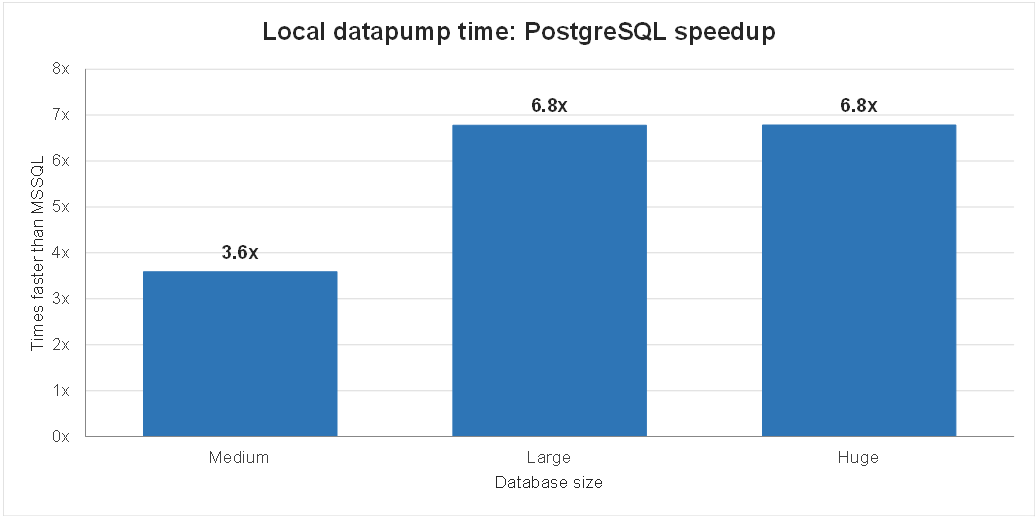
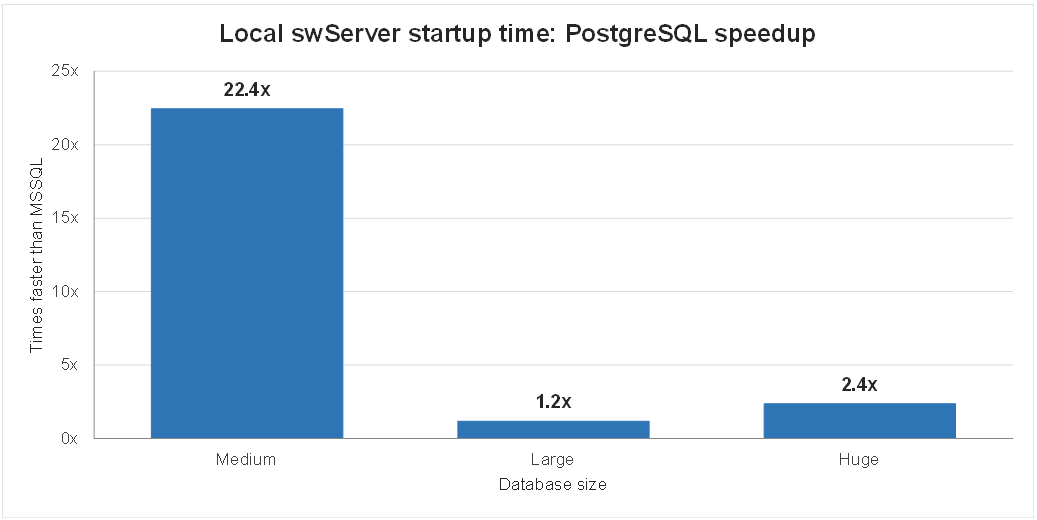
Here are some comparisons between PostgreSQL vs MS SQL if you are considering a move to PostgreSQL:
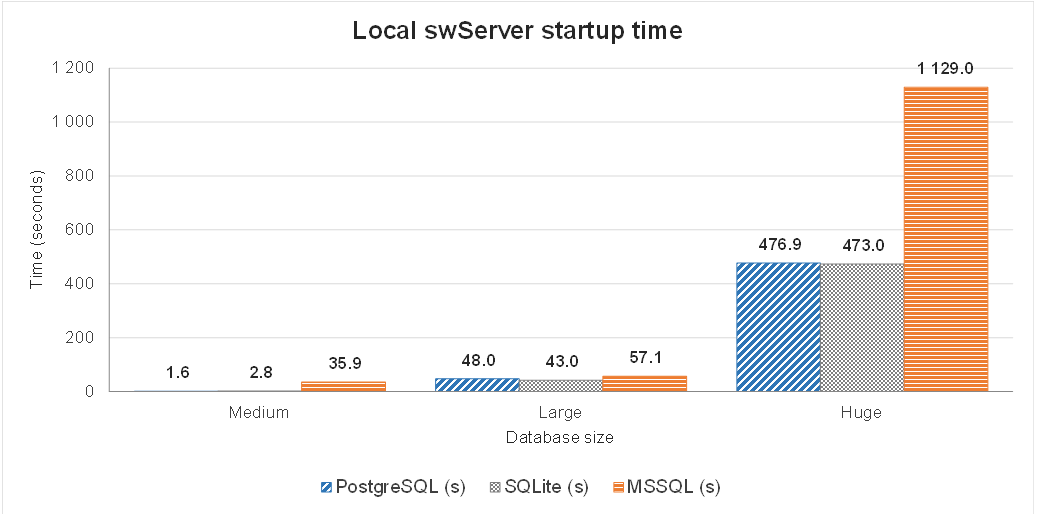
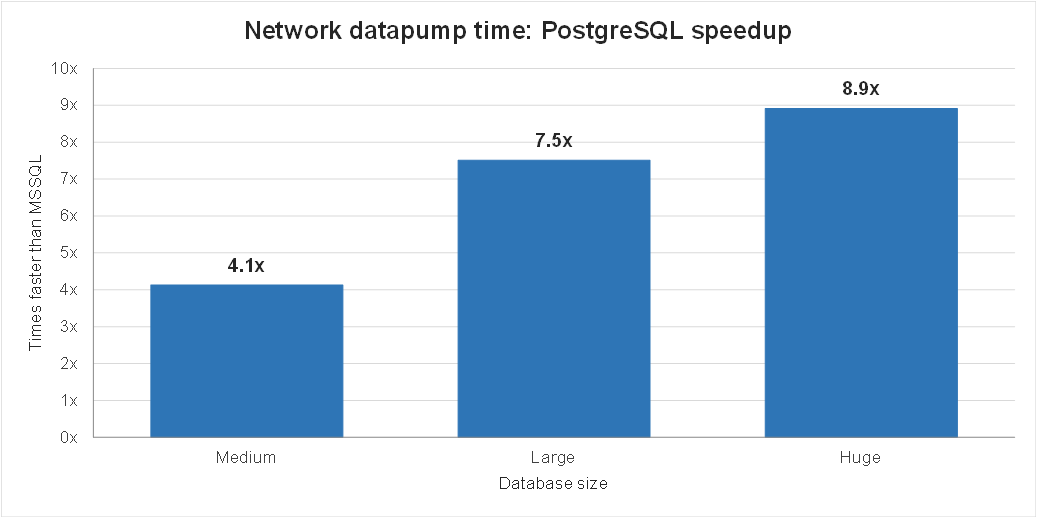
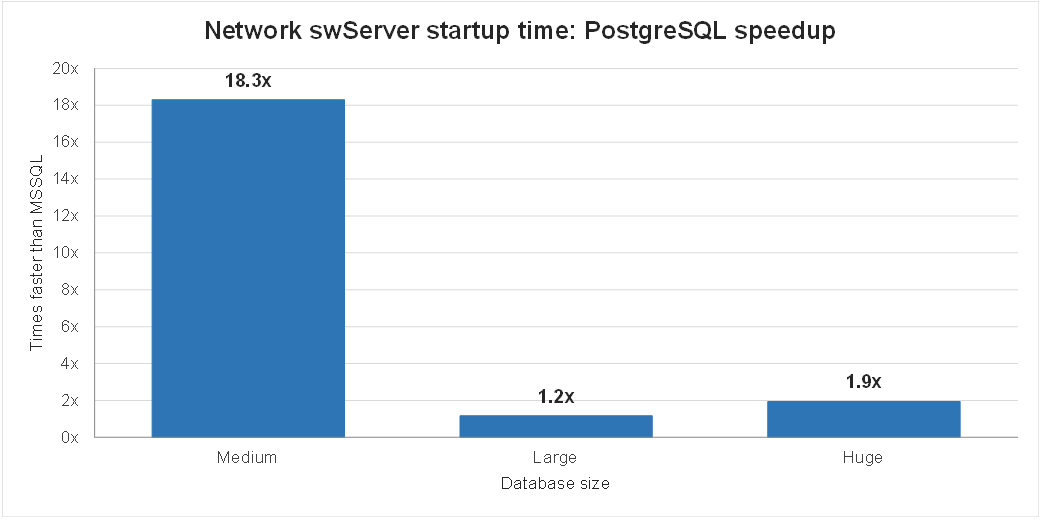
Server: Improved swTestServer |
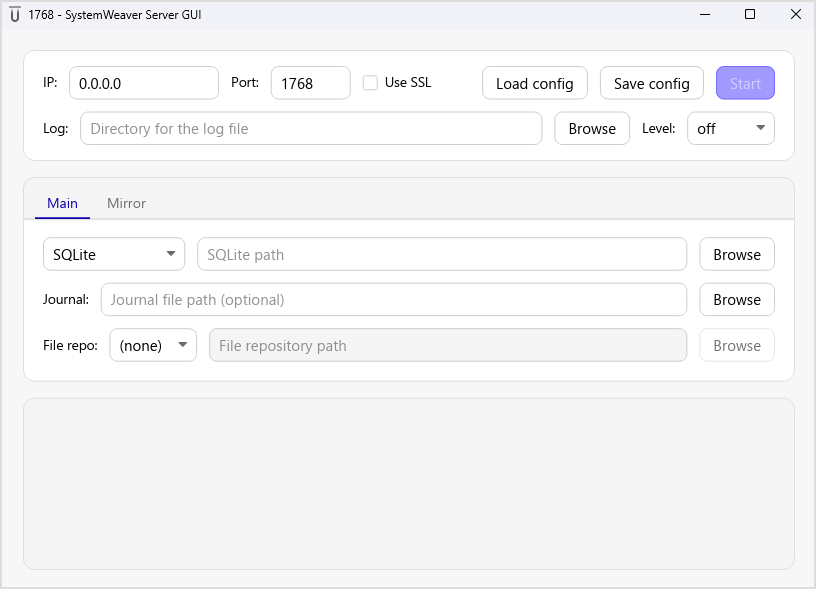
R53 brings several enhancements to the next-generation swTestServer application, introducing new capabilities and restoring features from the legacy application.
- UI improvements: Light and dark themes that automatically follow your system settings.
- Port number in the title bar: Easily identify the port on which the server is running.
- Configuration management: Automatically loads swServer.ini on startup. You can also load a configuration file manually or save the current UI settings to a file.
- PostgreSQL support: Adds support for PostgreSQL.
- Server termination: Adds an option to kill an unresponsive server.
Bug fixes
About: Reading the wrong date for Release date
This resolves a case where the Release date on the About page did not reflect the correct date. 24018
Admin: Move/assign user to key with no available licenses
This resolves a case where an Administrator was able to assign a user to a license key that had no available licenses resulting in users in that key not being able to log in. The Administrator now receives a "There are no available licenses to assign this user." message instead. 17039
Admin Users: Role updates not shown in list
We have now implemented so that a Role assignment change is immediately reflected in the Users list. 24001
Architect: Problem with filter and edit type name
An issue was fixed where editing a Type’s Name after filtering the Type tree could unexpectedly return the selection to the top-level Obj node when pressing Backspace multiple times. This could cause subsequent Backspace presses to clear Obj. 24608
Attributes: Collection was modified error
This resolves a "Collection was modified; enumeration operation may not execute" error when copying and pasting part attribute values.
Attributes: Refresh problem with multi-select
This resolves a refresh problem when the Attributes view is loaded and you do New version and replace of multiple items in the Structure tree. You can now immediately update the attribute values without first having to refresh the view. 23930
Attributes: Unexplainable yellow background upon multi-select
This resolves an issue in the view where, after clearing the values of some item attributes on multiple selected items, a couple of attributes continued to display a yellow background, incorrectly indicating that their values differed. 23789
Configurable graph: Missing right-click menu
This resolves cases where the right-click menu was missing from the Graph view area. 24258
Context tree: Added parts not displaying in tree
This resolves a problem where added parts (in <Context>) were not shown in the Context tree view's tree structure.
Description templates: Access violation
This resolves an error thrown when you select and preview an Item Description template that contains a table. 22645
Edit XML dialog: Data invalid error
We fixed an issue where XML configurations containing spaces after the closing tag in the Edit XML dialog incorrectly triggered a “Data invalid” error. Trailing spaces are now handled correctly. 24173
Entra ID/Keycloak login when launched from different directory
This resolves a problem with the Sign in with Microsoft and Log in with Keycloak buttons missing when the client is launched from a different directory. 24027
Export to Excel option
In recent releases, only Export to CSV was available in some views. It is now available again. 18653, 24480
Errors when printing to PDF with bookmark
This release includes fixes for an error that occurred when Section No. “0” was used, as well as for instances of the following error messages:
• “Could not find the version header comment at the start of the document.”
• “Unknown error in ProcessPdfDocument.”
23879
Issues: Don't see error on editing issue
An "Access denied" message will now present when a read-only user attempts to edit an issue. Previously, there was no information provided as to why their changes did not save. 24409
Login: Server selection and filtering
In the Architect/Admin client, selecting a Server from the drop-down list no longer filters the list by the current selection when the list is expanded again. 24264
Occurrence matrix: View name not updated immediately
This resolves an issue where the name of a loaded Occurrence matrix did not update without refreshing the page. 22918
Occurrence matrix: Missing remove option
This resolves a problem with the right-click Remove option not displaying the first time you show the menu. 24257
Path query: Can't compare str with [handle]
This resolves an error "Type checking failed for path query expression. error: Expected left-hand-side of `in` operator to the type of an element or subset of the right-hand-side (`[handle]`), but found `str`." Strings in a Handle are now handled by the server as they were in previous releases. 24218
Server: Identity attribute with sequence ID starting with a digit
This resolves a problem in the (next-gen) server with identity attribute types whose sequence ID starts with a digit. The server could not generate values for them, so new items were left without an identity value. Such types now work as they do in the legacy server. 24819
Template item: Show field values not working
This resolves a problem with the Show field values option not showing the values.
Trees/grids: Hidden columns not showing text after un-hide
This resolves an issue where unhiding column(s) that were previously hidden, values did not immediately display in the unhidden column(s). 24364
Unable to clear Set of Users attribute
This fixes the problem of not being able to clear values from a Set of Users attribute in the Select users dialog. 15893
WeaverAI: Various fixes
The following fixes have been made for this release.
- Fixed issues with non standard URLs
- A configured gateway or third-party BaseUrl is honored, so traffic no longer goes to the vendor endpoint. This fix was ported from R1b1.
- A turn still running when the panel was rebuilt or deactivated now finishes visibly and keeps its answer.
- A restored conversation that was mid-turn no longer opens blank.
- Model, tool and role changes apply to the intended conversation, not whichever one was selected on the host.
- Caching boundaries and cost accounting are fixed.
Known issues
- swTestServer: No backup button in UI. Planned for a later release.
- Coverage item to item: Problem with Match filter [24902]
- DataValue attribute: References to undefined entity error [24720]