
This article describes the new features, improvements and fixes included in this release of SystemWeaver. When upgrading, we recommend that all client and server applications be upgraded as some bug fixes and/or enhancements require this.
These release notes are also available as a MS Word document, as well as a SystemWeaver XML file. Both are attached at the bottom of the article. You can also print out this article as a PDF using the Print option.
Note: Special attention should be given to the items highlighted in yellow as they will require additional planning/steps for your organization pre and/or post-upgrade if the view/tool affected is being used in your installation. |
Administrators
| Name | Description | Type | Issue ID |
| Architect and Admin in new SystemWeaver client | As part of our ongoing roll-out of the next generation SystemWeaver client, the Admin utility is now included in the new SystemWeaver client together with the Architect utility. This new SystemWeaver client has been given a temporary orange application icon:
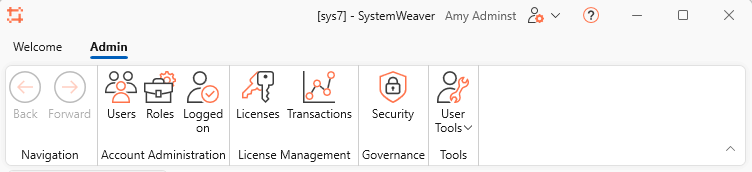
Planning Unchanged system requirements when upgrading from R49 or later releases. System requirements: .NET 8 (Desktop Runtime) Visibility of Architect and Admin utilities Visibility of the Architect and Admin tools in the SystemWeaver client is determined by Role assignments. Users with only the 'Administrator' role will see only the Admin tab:
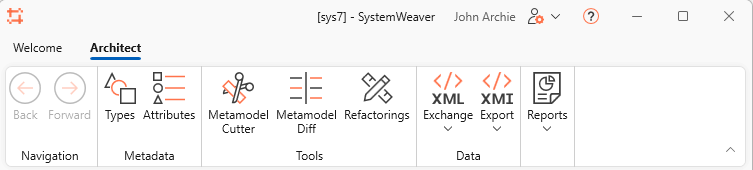
User with only the 'SW Architect' role will see only the Architect tab:
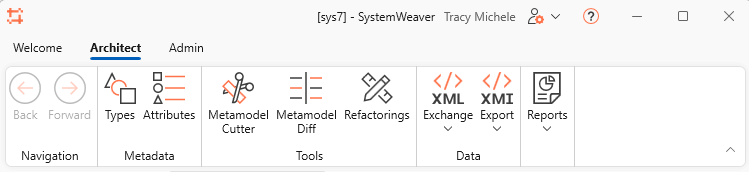
Users with both the 'SW Architect' role and the 'Administrator role with see both the Architect and Admin tabs:
The three predefined SystemWeaver accounts:
| New | 23619 |
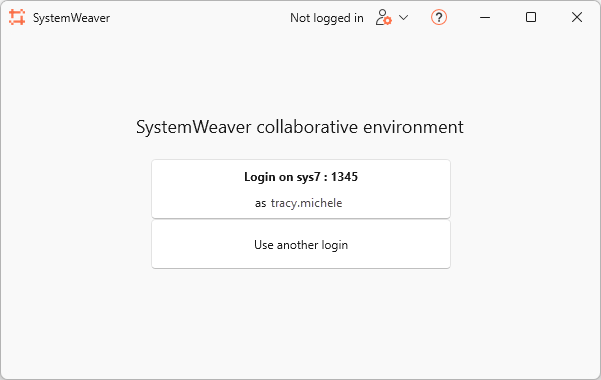
| Introducing the updated Admin utility | The Admin utility included in the new SystemWeaver client has gotten a face-lift and includes some improvements which are described below. To start with, there is a new Admin ribbon and page layout: 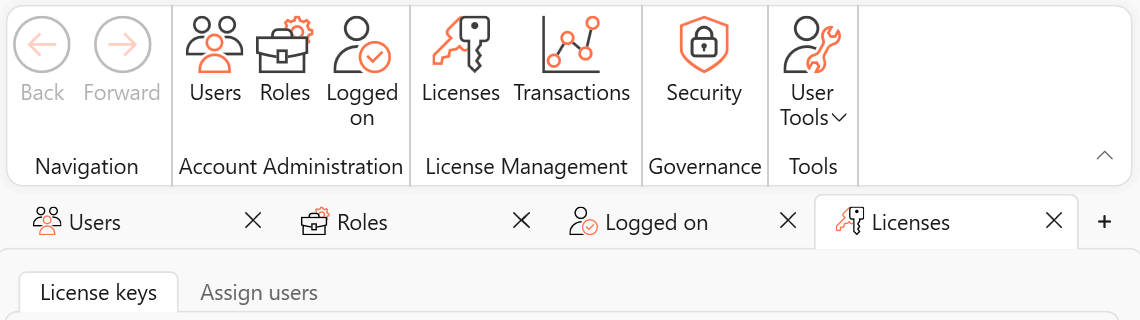 Login Upon opening the client the first time, a new initial landing page displays.
Login behavior depends on the authentication method you most recently used:
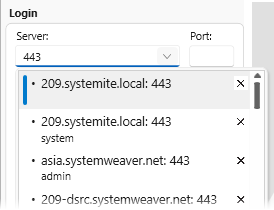
Since the most recently used login is remembered, Administrators can log in more quickly. This is an improvement over earlier releases of the Admin client. Filter login entries by server name or port
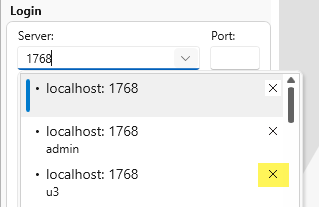
Support for deleting unnecessary login entries
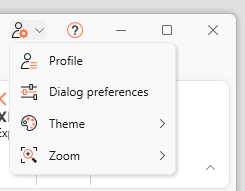
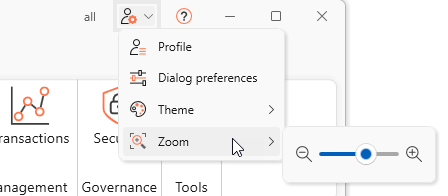
New User Settings menu added far right on the Title bar
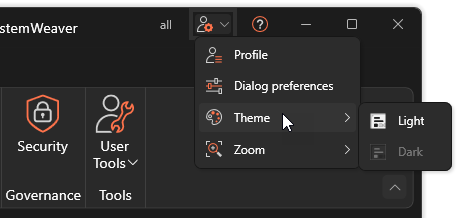
Introduction of Dark theme
New zoom in/out tool
| New | 23343 |
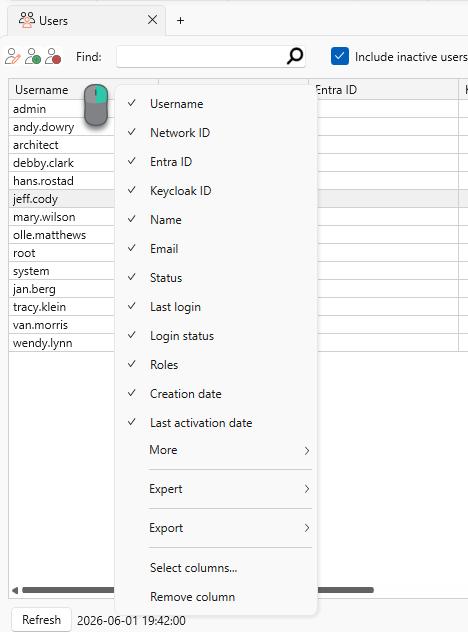
| Admin: Improvements to Users page | Administrators now have access to the standard column header menu in the Users list:
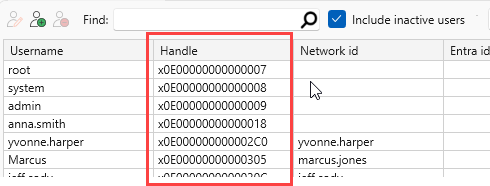
This enables you to add/remove columns as needed, e.g., you can add Handle to the display on-the-fly:
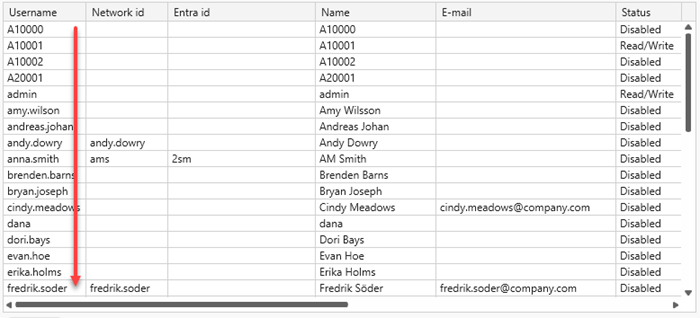
The Users list is now initially sorted by Username:
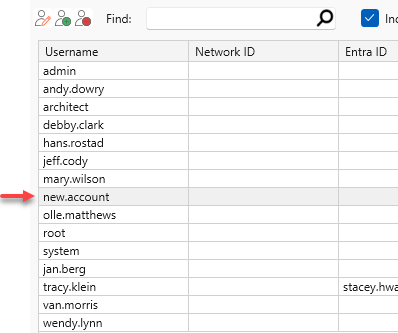
When you create a new user account, you'll now be automatically taken to its position in the list. New accounts are also inserted in alphabetical order, rather than being added to the end of the list.
Users who do not have the Administrator role can no longer view the Admin utilities thanks to the protected integration of these views in the new client. As before, the User settings menu in the swExplorer is available for end users. When logged in and performing Deactivate all, your own account is no longer deactivated. | Improvement | 23683 |
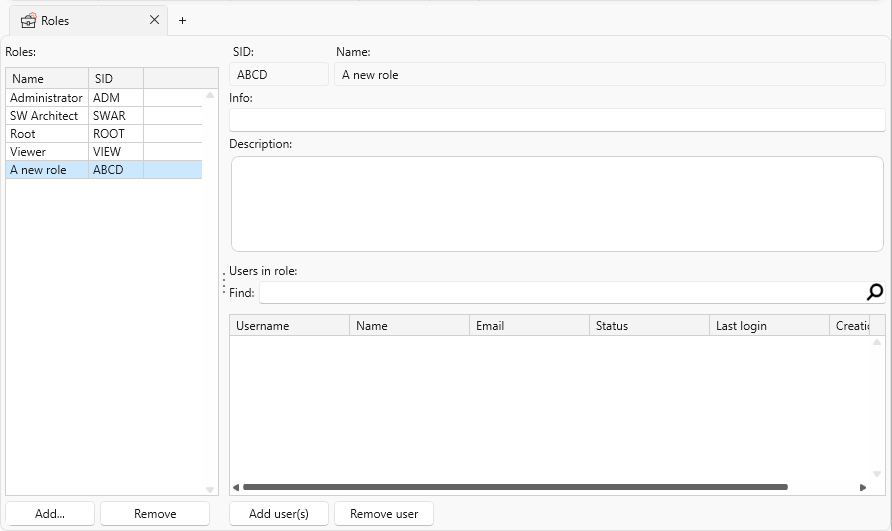
| Admin: Improvements to Roles page | When you create a new role, it remains in focus so you can begin adding information and users.
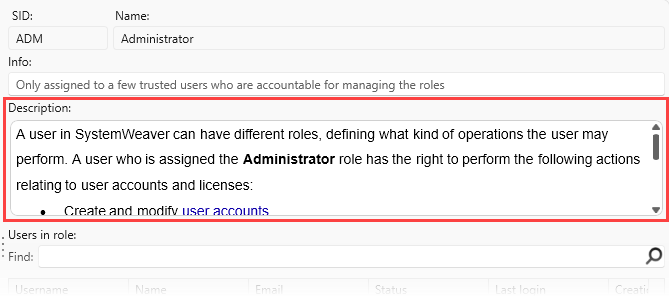
It's now possible to add a Description of a role.
| Improvement | 23343 |
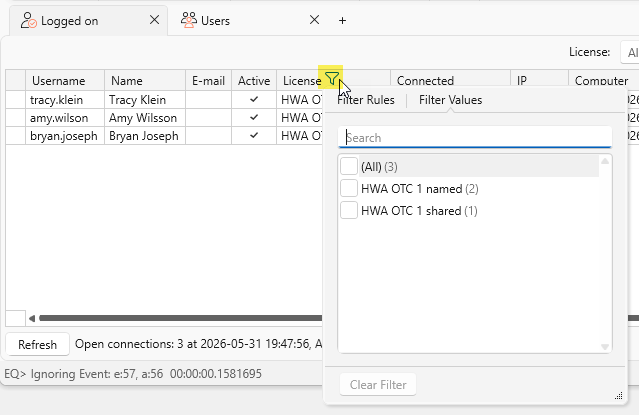
| Admin: Improvements to Logged on page | The Logged on page now includes a Filter tool for each column.
The export (Ctrl+A and Ctrl+C) of the Logged on page now includes the column headers.  | Improvement | 22742 |
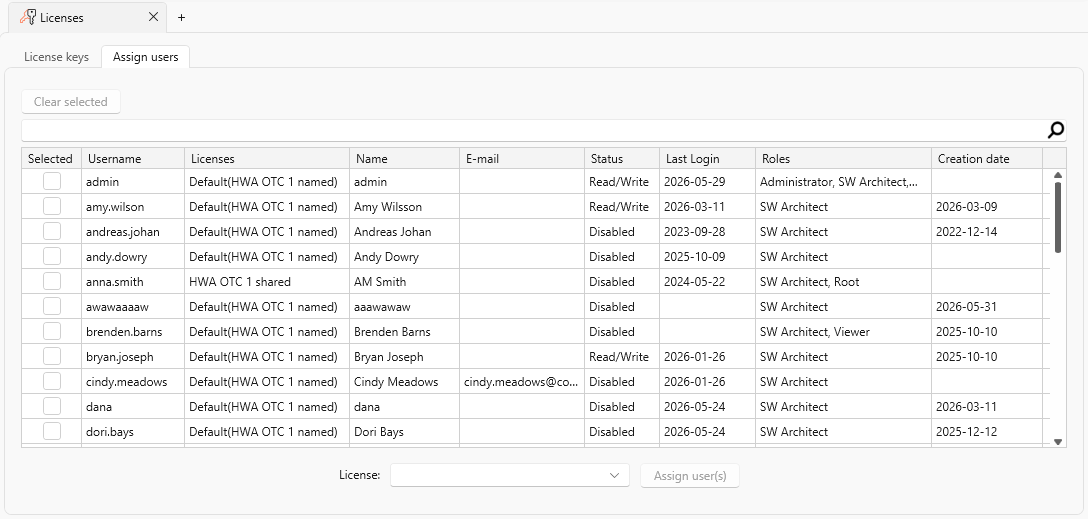
| Admin: Improvements to Licenses page | The initial sort of the Assign users list is now by Username. There's also support now for clearing a sort which was not possible before.
| Improvement | 23773 |
| Admin: Improvements to Import users tool | The Import users (from LDAP server) tool for creating new user accounts has been updated provides more user-friendly preview and filter features. 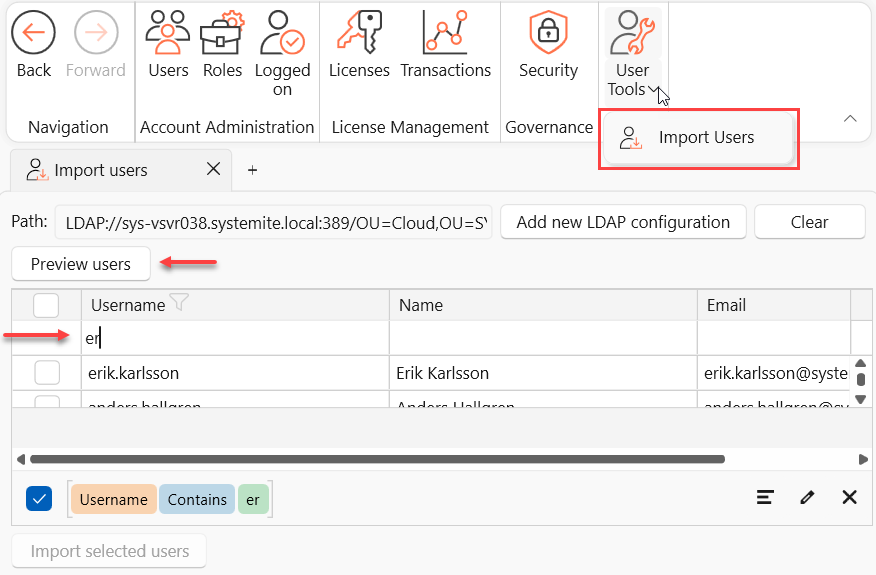 | Improvement | 23832 |
| Admin: License status info banner | A new red banner informs when a license key will soon expire, or is already expired. The banner is seen only in the new client. To close it, click the X. Once the key(s) expiration status is updated, the banner will no longer display in new client sessions. 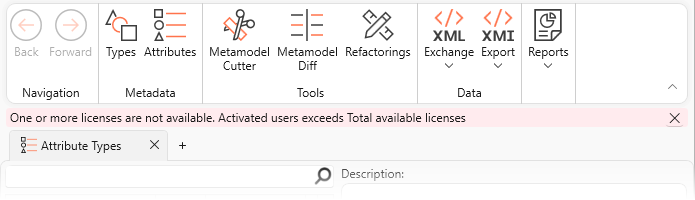 | Improvement | 23310 |
| Admin: Missing time stamp in user date properties | This resolves missing time values in the user account date properties. | Bug fix | |
| Admin: New weak password banner | We've moved the weak password message for better visibility. A new red banner now informs when the password for the 'admin' or 'system' account is considered too weak. These notifications are seen only by users with the 'Administrator' role and the 'admin', 'system', and 'root' accounts. Once the password has been reset to something strong, the banner will no longer display in new client sessions. 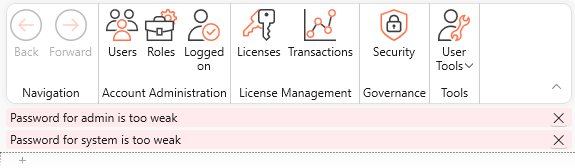 | Improvement | 23843 |

API/Rest API/Extensions API Users
| Name | Description | Type | Issue ID |
| API: Minor version update | SystemWeaver API upgraded from version 1.54.7 to 1.54.8 Not technically required to recompile if you’re upgrading from a release that uses the same major API version (1.54.x). However, you must recompile to obtain applicable enhancements and fixes included in the release. If you reference API assemblies with the specific version flag set to true for inhouse development, you must recompile. | Improvement | |
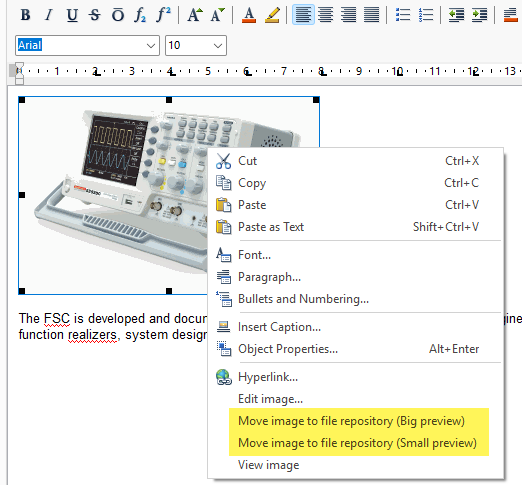
| API: Support for big image handling | A new call in the Client API, HtmlToRvfzUsingBigImages, enables you to handle any "big" images just as they are handled when working with "big" images in the Description editor of the client. "Big" images are images that do not fit within the allowed Description size limitation. The Move image to file repository option enables you to store the original image while adding a preview image to the Description. This new call is useful, e.g., during Item creation when an item Description is too large to import without the use of the preview option. The call includes a size threshold parameter. Images larger than the specified size are:
The following image formats are supported:
Note that the call HtmlToRvfzUsingBigImages doesn't write anything to the server; it returns the html converted to the canonical rich text format together with any images that have been replaced with previews. After that, you have to make the appropriate calls to the server as shown in the below example. Example code: if (_broker is null) throw new Exception("You need to be logged in.");
// Setting buffer size to 10 MB, because it needs to hold the original images: const int BUFFER_SIZE = 10000000;
string fileName = @"data\htmlWithJpeg.html";
SWUtility.RvfzAndBigImages rvfzAndBigImages = SWUtility.HtmlToRvfzUsingBigImages(fileName, "Arial", 10000, BUFFER_SIZE);
IswItem item = _broker.TopLibrary.CreateItem("I", "htmlImportWithBigJpeg"); // Add description, the description will contain references to files in the file vault, // but those files are not yet created. item.Description = SWDescription.MakeDescription(rvfzAndBigImages.Rvfz); // Here we add the images to the file vault. foreach (SWUtility.RBigImageData imageData in rvfzAndBigImages.BigImages) { // Use whatever logic needed to create a good file name. // Correct suffix is needed or you will get into trouble launching a viewer in the UI. _broker.AddFileByData($"image.{imageData.suffix}", imageData.Data); } | Improvement | 23588 |
| API: Support for retrieving computed attributes | Using the Client API, it is now possible to retrieve attributes of type Computed. The below code will run the computed attribute on the item: IswAttribute computedAttribute = item.FindAttributeWithSID(computedAttributeSID);
string value = computedAttribute.ValueAsString; | Improvement | 16403 |
| ExtensionsAPI: Tree view setting | The ExtensionsAPI call OpenItemInView has been updated with the possibility to set the "Structure tree view setting" when opening InNewWindow. This is done by adding the structure tree view name to the call: IswMultiInstanceItemViewContentHost.OpenItemInView( IswItem, THowToOpenType.InNewWindow, "", "", structureTreeViewName); Examples of Structure tree view settings as seen in the swExplorer client: | Improvement | 22909 |
| ExtensionsAPI: Version update | The SystemWeaver Extensions API has been updated. This affects extensions placed in the swExplorerExtensions directory. Extension views must be recompiled against the updated SystemWeaverExtensionsAPI.dll. This is a breaking change. | Improvement | |
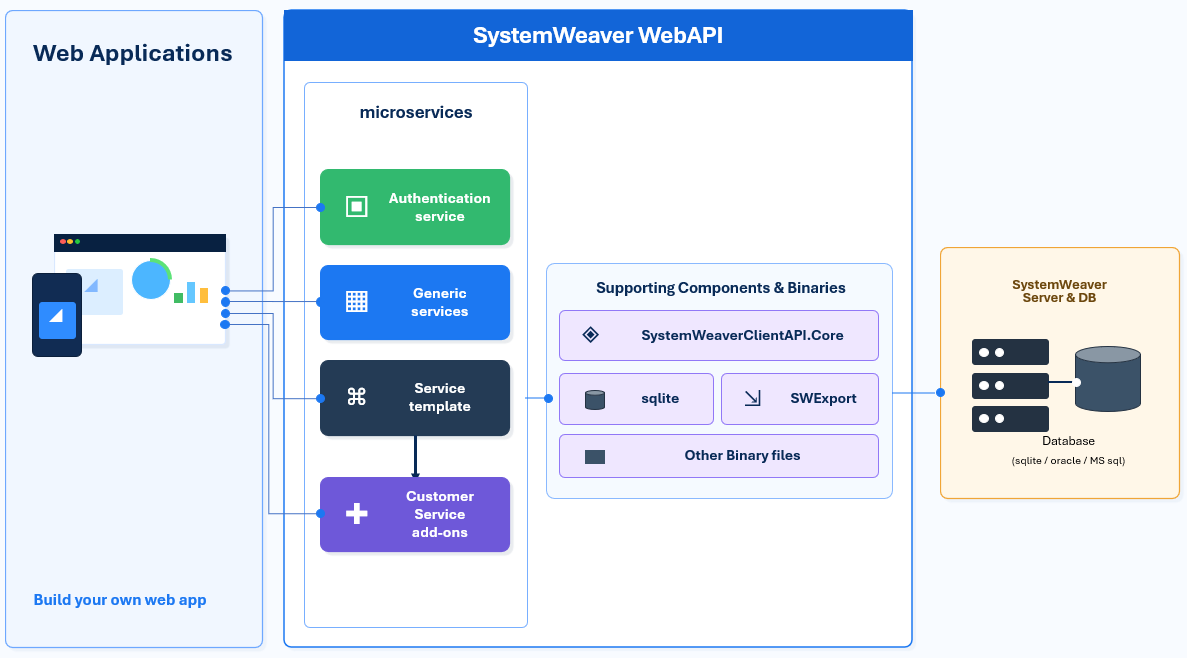
| Initial release of Web API | This release officially introduces the first version of the SystemWeaver Web API. A new web-oriented capability designed for scenarios where performance, scalability, and customization are important. Unlike the SystemWeaver REST API, which is designed around standard REST principles and does not maintain cached data between requests, Web AI is built on top of the SystemWeaver Client API. This enables efficient data caching and makes it better suited for interactive web applications that require fast access to SystemWeaver data. Web AI is delivered with a set of default services provided by SystemWeaver, while also being extensible to support company-specific needs. Custom services can be added using the service templates provided by SystemWeaver. The architecture also allows organizations to add a dedicated database for web-related data that should not be stored in the main SystemWeaver database. In addition, it can utilize the SystemWeaver Tool Exporter, enabling access to reports, documents, graphs, grids, and other exported views.
Key capabilities include:
The existing REST API remains fully supported and available. Customers can continue to use the REST API while evaluating and adopting the new Web API where its enhanced extensibility and customization capabilities provide additional value. To obtain the Web API, request it with your Kallebäck (R52) upgrade package. | New |
Architects
| Name | Description | Type | Issue ID |
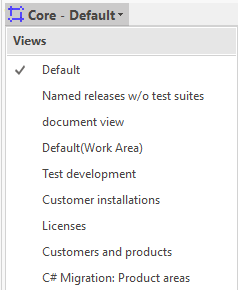
| Architect: Active page displays upon login | Upon loading the Architect, the most recently loaded page will now automatically display content. Manual refresh is no longer needed. 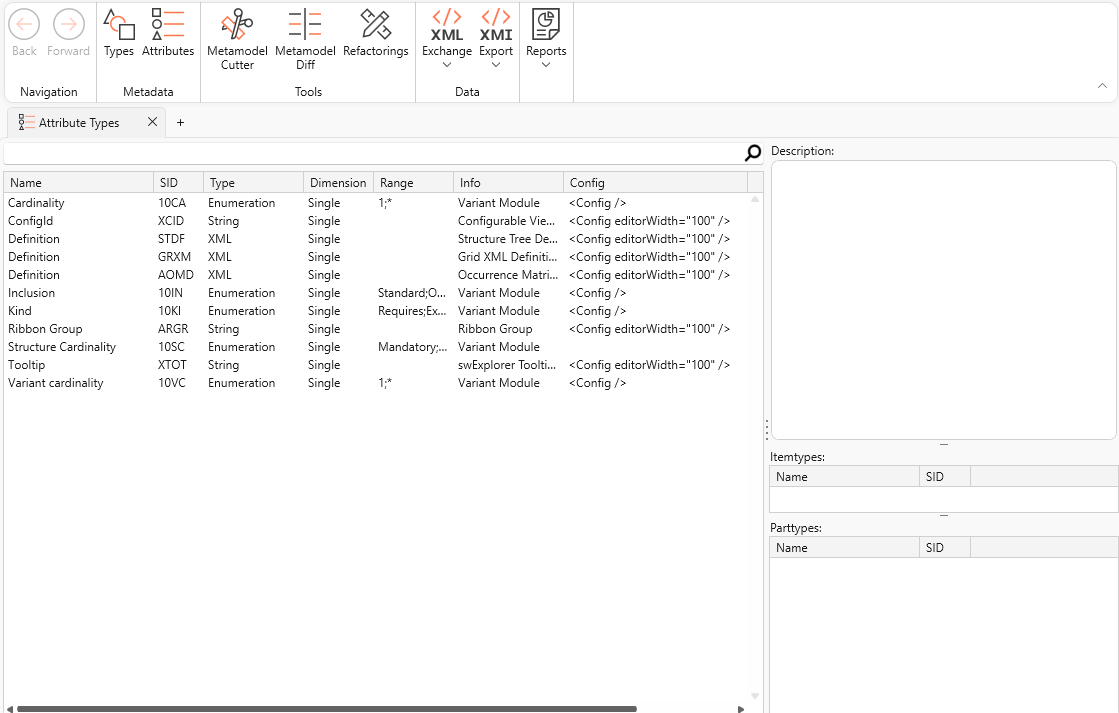 | Improvement | |
| Architect metadata types: Unable to view some field codes | Field codes such as "Deprecated" and "Config" can now again be viewed in the Metadata types tree. | Bug fix | 23654 |
| Architect: Change of parent not displayed | This fixes where a change of Parent of an Item Type is not reflected in the Item type definition immediately even though the change was successfully made. This is now resolved. Note that one must currently log out to refresh the Type tree. | Bug fix | |
| Architect: Could not find file Ribbon.xml | This resolves a "Could not find file 'C:\windows\System32\Ribbon.xml'" error when running the client from the Windows taskbar thumbnail. | Bug fix | 23401 |
| Architect: Login with new session | This resolves a problem with the New session login option not working in the Architect client. | Bug fix | 23126 |
| Architect: Missing item hint on config Items | This fixes a "No service for type" error when attempting to use Alt+Click to view the item hint for Reports, Description templates and Config items. | Bug fix | 23859 |
| Architect: Reintroduce size indicator in description editor | We have reintroduced the Description size indicator in the Description editor in the Architect. This indicator was missing in the Skår (R51) release. | Bug fix | 23214 |
| Architect: Remember main window position | The position and state of the main application window is now remembered between sessions. | Bug fix | 23138 |
| Architect: Rename type when filter applied | This fixes a problem that occured when renaming a Type when a filter was applied in the Type tree and the new value being entered did not match the filter. | Bug fix | |
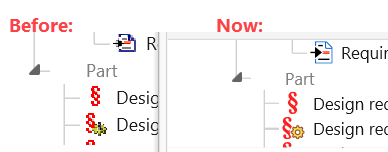
| Improvements to Icons | We are in the process of replacing Type and GUI icons and have come further with this work. Architects can see this in the new client. The new icons are .svg. Example zoom 150%: | Improvement | 22942 |
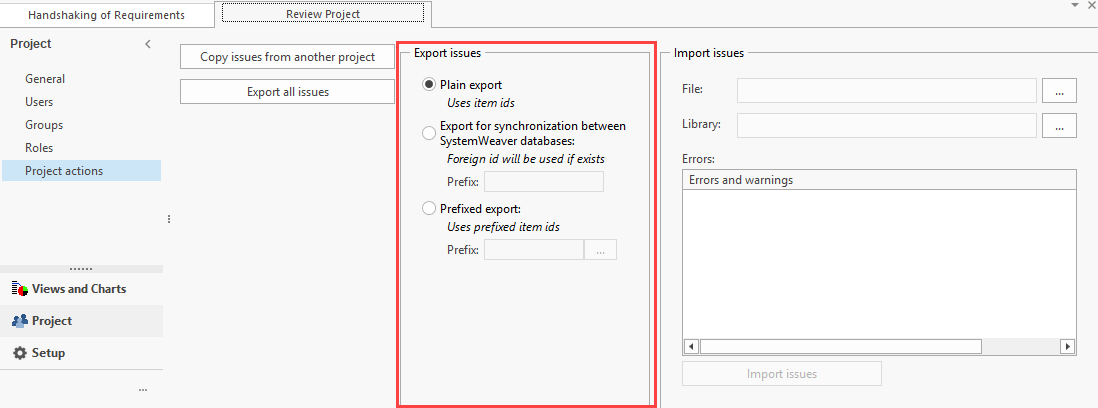
| Issues export/import: Support for prefixed item xIDs | Previously, exporting all issues only supported a Plain export, which used the Item IDs of any linked items. The Project Actions page now offers the same Export options as the XML Export view. This means item relations can now be imported correctly when items have prefixed xIDs. During import, links between items are preserved by matching the prefixed xIDs in the target database.
| Improvement | 22896 |
| Items: Indication of inheritance | We have reintroduced and updated the style of the symbol indicating that an Attribute or Part is inherited from a Base item. Inheritance enabled is set in the Architect on the Item type:
The updated symbol on inherited Attributes and Parts:
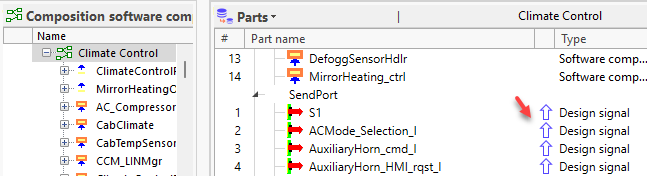 | Improvement | 22829 |
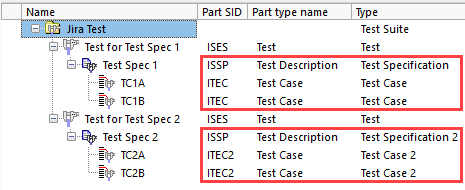
| Jira Test case issues: Support for multiple paths to test case | The Jira integration view now supports cases of multiple Test Case models, i.e., multiple paths to Test Cases, for use with the Test case issues tab.
<TestNodePath>ISSP;ITEC2;ITEC</TestNodePath> Given the above TestNodePath configuration in the Jira view definition, when standing on any Test Specification type within the Test solution, users will be able to view the Test Cases from the respective Test Case model, and their linked Jira issues, on the Test case issues tab.
| Improvement | 23747 |
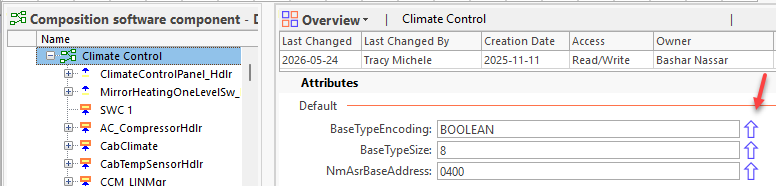
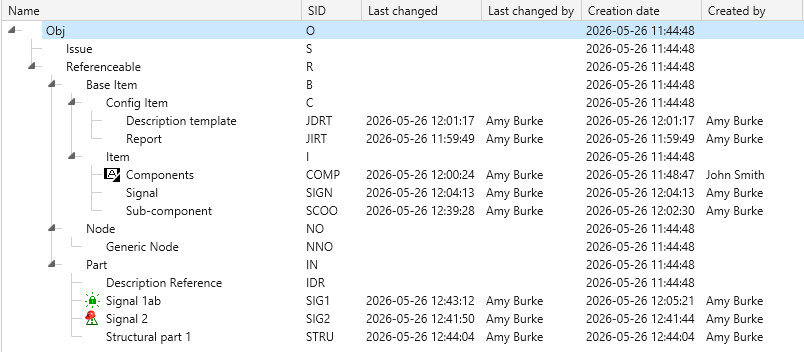
| Metadata: Addition of last changed and creation properties | The following information is now captured for Item types, Part types, and Attribute types.
These properties display by default in the Metadata Types tree and Attribute Types list in the Architect: Metadata Types:
Attribute types:
The changes listed below do NOT affect Last changed of Item/Part type:
| New | 15384 |
| Metadata: Display DefType, RefType and Attribute type SIDs | When you view the Definition for Item and Part Types in the Architect, you'll now see the SIDs for:
 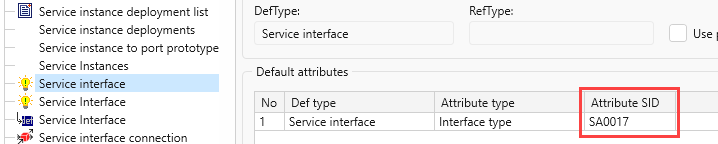 | Improvement | 23092 |



IT Administrators
| Name | Description | Type | Issue ID |
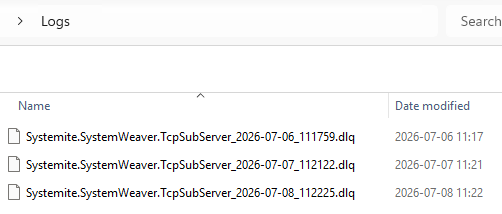
| Server: New DLQ file split | This will make a new DLQ log file every new day or when the file reaches 2GiB, whichever comes first.
| Improvement | 22351 |
| Security improvements | This release includes several enhancements to strengthen platform security, access control, and system resilience. Key improvements include:
These updates are part of our ongoing commitment to maintaining a secure, reliable, and modern platform. | Improvement | |
| Server: Subserver dependency files merged | The Systemite.SystemWeaver.TcpSubServer.exe component is built on the .NET technology. As of R52, the subserver has been upgraded to .NET 8, which has enabled us to build it as a self-contained, single-file executable. This is potentially a breaking change if you do not have .NET 8 installed. The benefits of this are reduced file clutter and simpler deployment. You no longer need to manually install a compatible .NET runtime on the machines you're deploying a SystemWeaver server on. The needed runtime is already embedded in the subserver executable itself! | Improvement | |
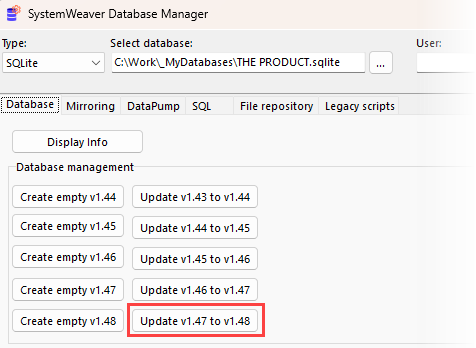
| Server: Update of database version | The database version identifies the version of the internal database schema used by SystemWeaver. With Kallbäck (R52), the version has been upgraded from 1.47 to 1.48. This is a breaking change. System Administrators use the swDatabaseManager to update the database version. See Updating the Database Version.
Example upgrade from database version 1.47 to 1.48:
If you are upgrading from a database version earlier than 1.47, you would simply click each "Update..." button in consecutive order until you have completed the update. 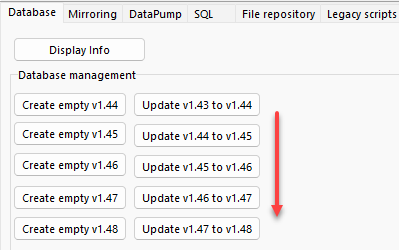 | Improvement | 23721 |
| Statistics log: Logging library access right changes | The Statistics log can now include entries for changes to a User’s or Group’s access rights to a library. The new call type for this event is "ChangeAccess". The following fields are included in the log entry:
The values shown for each access right indicate the resulting permission state: "True": Access was granted. "False": Access was not granted. { "time": "2026-04-13 09:19:13.7247", "seqId": "126", "sessionId": "3", "ip": "127.0.0.1", "userId": "x0E00000000000009", "username": "admin", "call": { "type": "ChangeAccess", "library": "x13000000000210CB", "entityId": "x0F00000000023BD8", "entityName": "FuSa Team", "read": "False", "write": "False", "change": "False", "itemsWrite": "False" } }, { "time": "2026-04-13 09:19:34.5768", "seqId": "132", "sessionId": "3", "ip": "127.0.0.1", "userId": "x0E00000000000009", "username": "admin", "call": { "type": "ChangeAccess", "library": "x13000000000210CB", "entityId": "x0E00000000024519", "entityName": "evan.hoe", "itemsChange": "False" } } To include this with your upgrade:
| New | 23206 |
| Support for Keycloak authentication | SystemWeaver introduces another alternative sign-in method beyond username/password and the existing Network ID and Entra ID authentication. Keycloak (an open-source IAM solution) authentication can now be used in our client applications and the ClientAPI. This update provides another means of benefiting from multi-factor authentication (MFA), Single Sign-on (SSO), easier offboarding, etc. To utilize Keycloak authentication for SystemWeaver, there is one additional configuration file, Systemite.SystemWeaver.TcpSubServer.exe.json, needed for the main server installation which is provided in your Kallebäck (R52) upgrade delivery. (A separate .json is not needed for mirror server installations.) Example: { "Keycloak": { "BaseUrl": "https://keycloak.example.com", "Realm": "myrealm", "ClientId": "myclient", "ClientSecret": "a1bcDEFGHZOXbCZzeWsGtkm61eVLie8D", "RedirectUri": "http://localhost:5000/callback", "Scopes": "openid profile email roles" } } 1. Copy the provided example json file to your main server installation. 2. Open the file in a text editor app and replace the dummy values with valid values from your Keycloak:
3. Save your changes and remove the .example suffix from the file name. 4. Restart the server. 5. A SystemWeaver Administrator must enter the Keycloak Usernames in the SystemWeaver user accounts. Note: There are a number of additional files in the installations for Keycloak. | New | 22879 |
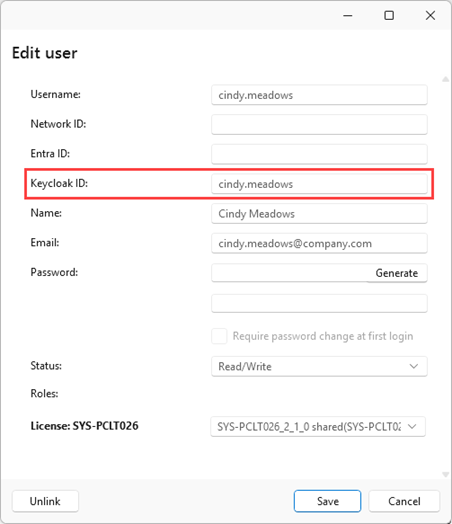
| Setting up user accounts for Keycloak use | To set up user accounts for Keycloak authentication, enter the user's Username from Keycloak in the Keycloak ID field in their user profile using the Admin utility.
As before, a user account must have at least one of the following login alternatives saved in their profile:
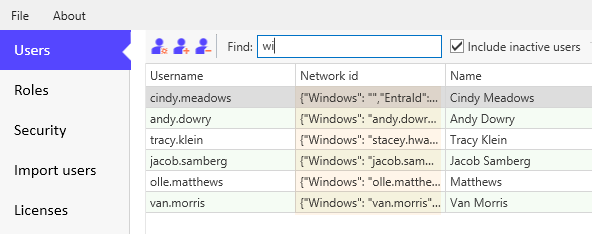
A Keycloak ID can only be used in one user account. Note: Although not a breaking change, if an older swAdmin2 client is used, the Network ID value will appear parsed. We recommend using the new Admin utility.
| New | 23709 |
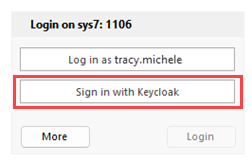
| Login: Using Keycloak to log in | If your organization has configured a SystemWeaver server to accept Keycloak authentication, users can click the Log in with Keycloak ID button to use their Keycloak Username to log in.
Next, users are prompted to log in to their organization's Keycloak to complete the authentication process. | New | 23710 |
| Next-gen server: Improvements and planning | The next-generation server application continues to be optional with this release. Each of these improvements are described separately in these release notes:
Planning:
| Improvement | |
| Next-gen server: Early-access Linux support | Linux is now a supported platform for the next-generation server. This has been a frequently requested addition, so we're happy to finally be able to share it with you. Linux binaries are not delivered by default. Contact us to request them, and we'll help you get set up. We want to be involved and assist with early deployments, to ensure a smooth experience for you and to learn more about what particular needs you have regarding distribution support, service management, etc. We expect many customers will want a .service file, Docker container, dpkg/rpm packages, etc., but to be clear, none of this surrounding tooling is included in the early-access release. Conveniences such as these are planned for future releases. What will ultimately be included depends on what needs surface during the early access. For most setups, our Linux server should work as a complete alternative to our Windows server. If you run into anything unexpected, please let us know so we can make future releases even better! Two known limitations to be aware of:
| New | 23303 |
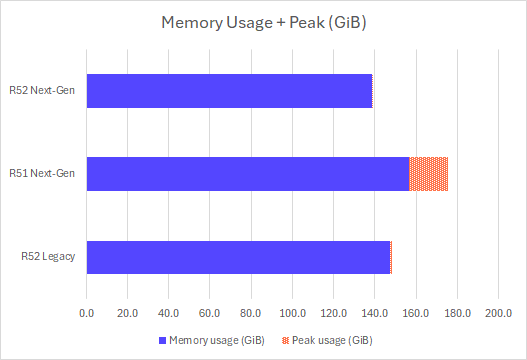
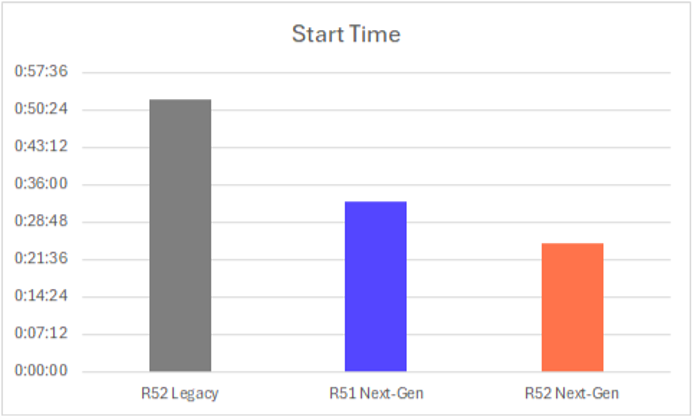
| Next-gen server: Improved memory efficiency and startup times | We've made further improvements to memory efficiency and startup times. You can now expect memory use in the R52 next-gen server to be >10% less than the legacy server. Start Time & Memory Usage
On a similar note, server startup times have been further improved. In R51 the next-gen server typically only took 60% of the time the legacy server did. In R52, this fraction has been further shrunk to circa 45%.
| Improvement | 23075, 23884 |
| Next-gen server: New swTestServer GUI | The R52 next-gen server will feature its own version of the swTestServer GUI application that's included with the legacy server today. This new server GUI will be mostly a one-to-one replacement for the legacy interface, with a few new features like being able to export the current state of the server configuration in the UI as a .ini file. | New | 22779 |
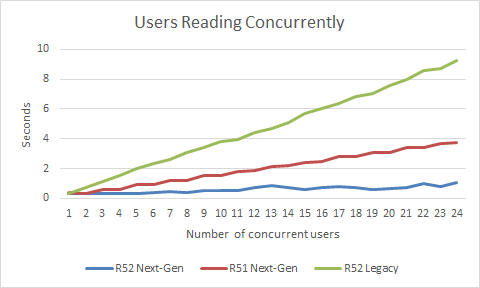
| Next-gen server: Simultaneous reads while writing | With the gated release of the next-gen server in R51, we already provided improved utilization of CPU threads within certain heavy calls, such as those involved in a General search operation. Now with the R52 release, you will see greatly increased parallelism between server calls! We're glad to announce that with the next-gen server in R52, the global R/W lock has been removed! Instead, we use persistent data structures to provide snapshot-based reads and serialized transactional writes. This means that write-calls still have to be executed in series, but they don't block read-calls and vice versa. This further lets us increase how many read-calls may be processed in parallel compared to before, without risk of starving writes, since a write no longer has to wait for all active reads to complete before it can start. We therefore recommend to turn off the scheduler in the dll.config file. Data consistency guarantees remain unchanged. This is purely a scalability improvement. You can expect your server to now be more capable of handling many users accessing data at the same time - the more CPU cores you have, the better the performance. Concurrent Reads
In this performance test, we simulate multiple users running the same read operation concurrently, and observe how each test run takes longer to complete the more users are simulated at the same time. What matters here is the trend - the R52 Next-Gen server stays nearly flat in comparison to the other two. (The name of the API call being measured is ExecutePathAsHandles, and the input it's called with has been adjusted for each respective server such that a single invocation takes the same amount of time on R52 Next-Gen, R51 Next-Gen, and R52 Legacy respectively.) Load Test
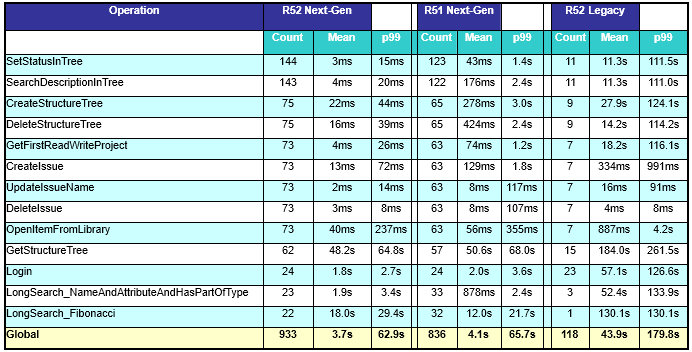
In the above performance test, we look at how the system behaves under a more realistic load. Unlike the previous test, we include write operations in addition to reads, and the operations are not all the same, but a whole range of operations each with its own performance characteristics. Note that the execution time statistics we show for each call do not say anything about how fast a call is individually, but is rather a description of how the call is scheduled in the context of many users accessing the server concurrently and putting it under heavy load. With the R51 Next-Gen server, the main improvement was that long searches were massively optimized, which resulted in the system being freed up to do other things. The improvements in the R52 Next-Gen server might not seem as drastic at a glance, but look closely at the p99 columns. The p99 numbers tell us about the worst-case experience: how long a user might have to wait when they call the server right when it happens to be under particularly heavy load. In R51 Next-Gen, we still had the reader-writer lock, which meant that a write call would be completely blocked from executing if there were any read calls in progress and vice versa. Look at CreateStructureTree for example. In R51 Next-Gen, the operation took around 3 seconds to complete in the worst cases, while in R52 Next-Gen, the wait time is gone, so the worst-cases are only 44 milliseconds. That's a 68x improvement! In general, users should experience the server as more snappy as their server calls will now be scheduled much more eagerly. Random lag spikes are essentially gone. In particular, logging in to the server is no longer blocked by slow searches. Just look at the table - on average 1.8s to log in on R52 Next-Gen versus 52.4s in R52 Legacy. | Improvement | 22782 |
| Updated .NET Framework version | The .NET Framework version used by the ClientAPI and ExtensionsAPI has been upgraded from 4.6.2 to 4.7.2. This is a breaking change. As a result, the minimum system requirement for swExplorer is now: Microsoft .NET Framework 4.7.2 or a later compatible version Any inhouse-developed applications, integrations, or extensions that reference the ClientAPI or ExtensionsAPI and are currently targeting an earlier .NET Framework version must be recompiled against .NET Framework 4.7.2 (or a later compatible version) before they can be used with this release. | Improvement | 22424 |
| TcpSubServer log: Performance improvement | We have made a change to the Systemite.SystemWeaver.TcpSubServer.exe.nlog file which, when Statistics logging is enabled, provides a minor performance improvement and eliminates empty rows in the TcpSubServer log, making log files easier to review. To benefit from this improvement, a configuration update is required. The Systemite.SystemWeaver.TcpSubServer.exe.nlog file now uses a revised rule order. An updated configuration example is included in all R52 deliveries, but existing installations can be updated manually by moving the StatisticsLogger rule to the first position in the rules section:
A server restart is required. On the topic of best performance...
| Improvement |

Users
| Name | Description | Type | Issue ID | ||||||
| Initial release of WeaverAI | This release includes the initial version of WeaverAI. Further development is planned for future releases, but it is available for evaluation now! The WeaverAI view is a generic AI assistant extension for the SystemWeaver client. It helps users interact with SystemWeaver data by allowing them to ask questions related to the selected information. Users can, for example, ask WeaverAI to review, summarize, improve, explain, or analyze SystemWeaver content. WeaverAI is generic, and can be used with any kind of SystemWeaver item types and structures, such as software components, requirements, design items, interfaces, and other engineering data. Example questions:
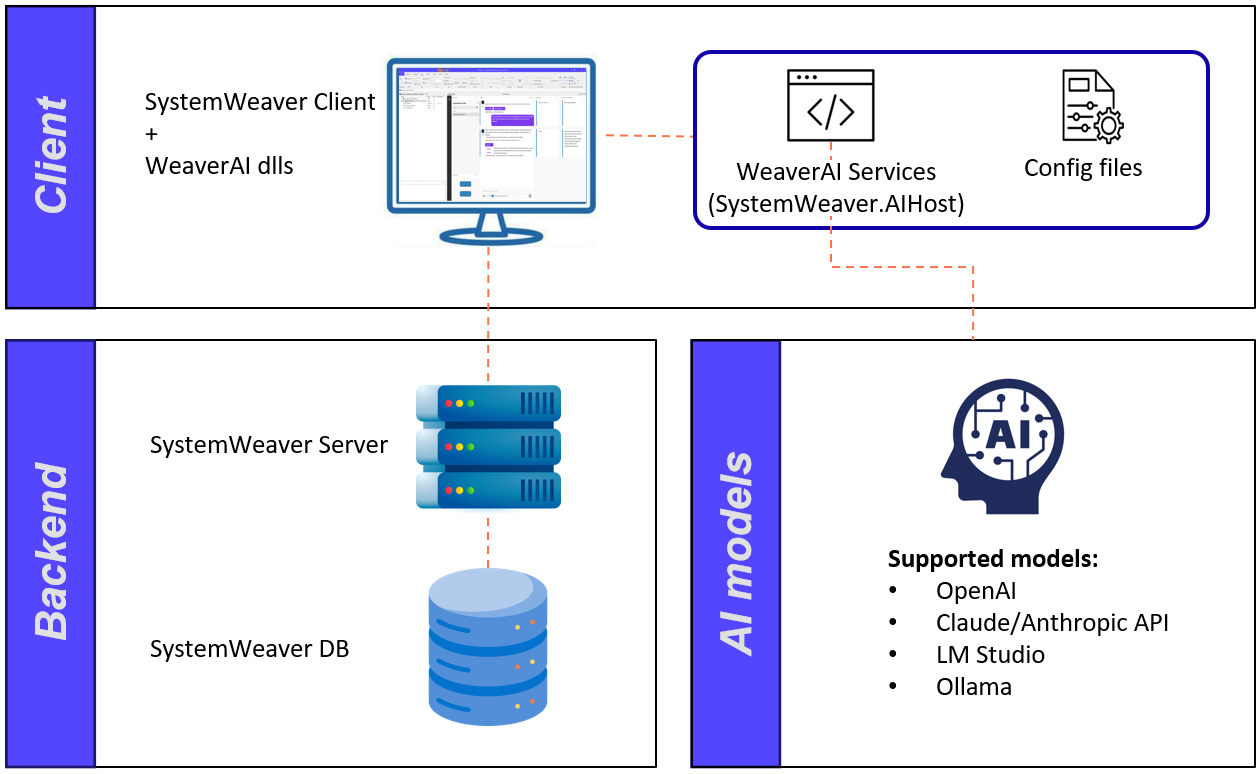
The view uses the enabled SystemWeaver tools to read the selected item and related information. It then generates a response based on the available data and the user’s question. More details can be found here. How it works: WeaverAI supports a flexible architecture where AI capabilities are integrated directly into the SystemWeaver Client through AI DLLs. The client communicates with AI Services locally on the client side, which connect to supported AI models. SystemWeaver data remains managed through the existing SystemWeaver Server and database backend.
Note: The WeaverAI configuration and setup will be updated in upcoming releases to improve scalability and provide broader support for future AI-related capabilities. Functions:
Note: SystemWeaver Customers integrate with the supported AI third-party services that they have access to through their own agreements or licenses. The integration and use of third-party software is at the Customer's own risk. SystemWeaver provides only the option for integration and does not assume any responsibility or liability for the use of, or the costs associated with, third-party services. | New | 23035 | ||||||
| Attributes view: Conflict between sort and hint | When sorting by a part attribute, a previous collision with the attribute hint display has been resolved. The standard Alt+click shortcut to get hint continues to work. 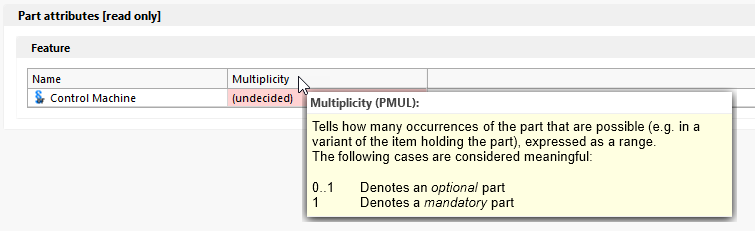 | Bug fix | 4807 | ||||||
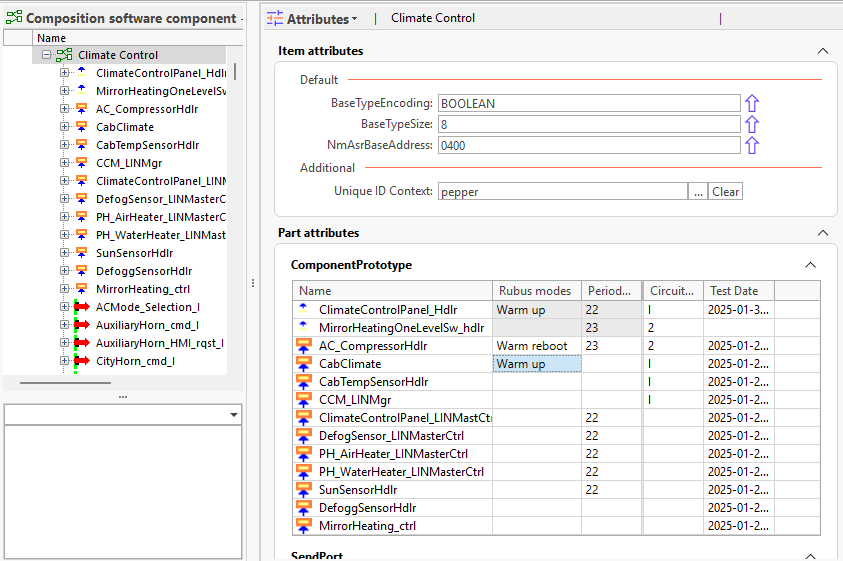
| Attributes view: Copy parts in attributes grid | It is now possible to copy Parts in the Part attributes grid to your clipboard. 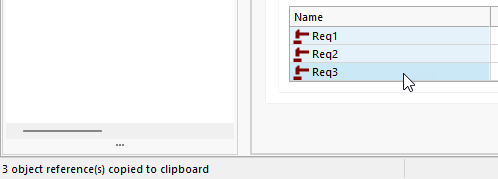 | Improvement | |||||||
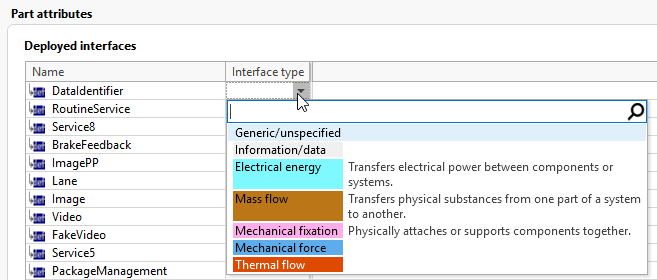
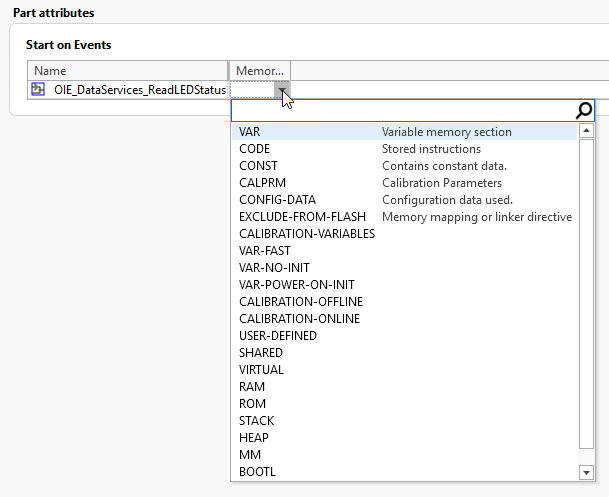
| Attributes view: UI improvements to part attributes grid | There's an updated theme for the Part attributes grid which following the theme of the client.
Enumeration single attribute editor Enum value colors and descriptions are now shown in the drop-down list. You can filter results by typing to find values anywhere within a value in the list.
The drop-down list height is now limited to 20 in this view, at which point a vertical scrollbar will appear.
A new hovertip is provided so you can view the entire attribute name. 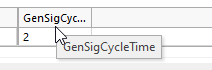 | Improvement | |||||||
| Description: Increased content size | The size limit for an Item Description has been increased from 128Kb to 192Kb. This will enable users to add, e.g., additional preview images.
| Improvement | 23938 | ||||||
| Description: Changed size limit for "big" images | The size limit for "big" images saved to the file repository has been increased from 2 MB to 3 MB. "Big" images are images that do not fit within the allowed Description size limitation.
| Improvement | 23588 | ||||||
| External reference array: Scrollbars and editor height | The Array of External reference attribute type now supports min and max editor height and provides scrollbars as needed.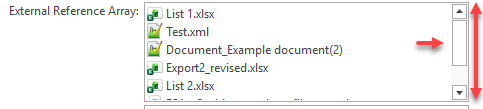 | Improvement | 23883 | ||||||
| External reference single attribute: Missing non-empty value icon | This fixes the missing warning symbol for External reference single attribute types that have no value when empty values are not allowed. | Bug fix | 23627 | ||||||
| Multiple versions: Faster loading time | The initial loading time of the view is significantly faster than before - approximately 95% faster! Examples 2,963 rows in tree Before: 17.14 sec Now: 0.70 sec 74,000+ rows in tree Before: 8.11 min Now: 1.52 sec What does the Multiple Versions view do? It shows all multiple versions for the complete structure tree grouped per item version chain. Unlike the Complete Status view, the Multiple Versions view displays items that are "CS Released" by default. If you need to remove instances of multiple versions prior to releasing the structure, the most efficient way to do this is through the use of this view. 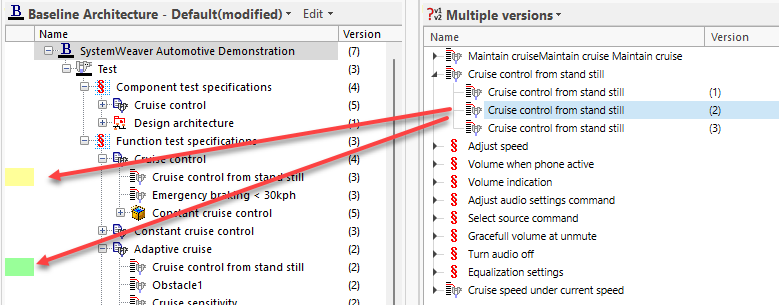 | Improvement | 20587 | ||||||
| Name: Increase of size to 128 characters | The character limit for the Name of the following Object types has been increased from 100 to 128.
Recommendation: Keep names short and avoid using the Name for descriptive content that it better suited for the Description. | Improvement | 23721 | ||||||
| New issue: Dialog size remembered | When you resize the New issue dialog, the size (height and width) will now be remembered. 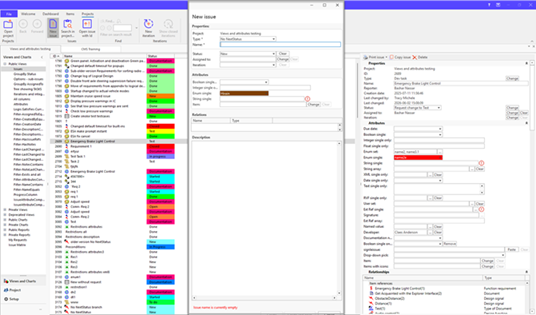 | Improvement | 23385 | ||||||
| Occurrence matrix: Find not working | This resolves a problem with using the Find tool in the Occurrence matrix view. | Bug fix | 23287 | ||||||
| Occurrence matrix: Replace Tree options with View menu | The right-click Tree options menu has been replaced with the View menu for setting the display of part types.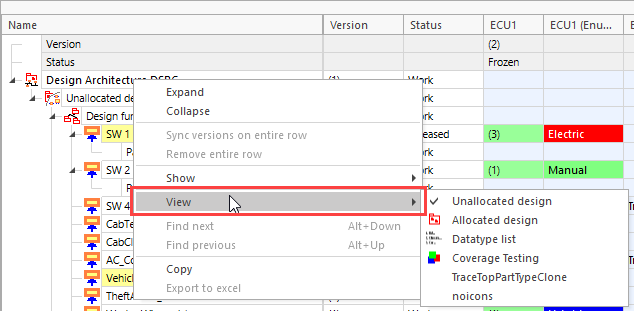 | Improvement | 20672 | ||||||
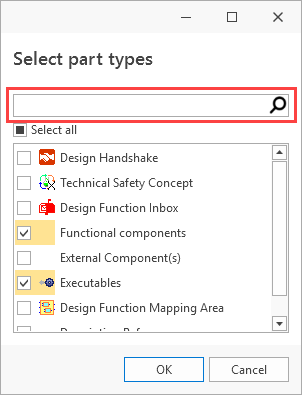
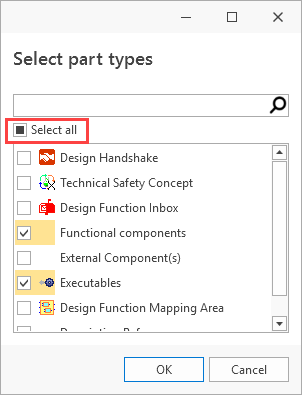
| Part types: Filter and select all features | The Select part types dialog, available in places such as the Structure Tree, now includes two new features designed to make working with large numbers of part types easier. Filter part types A new Filter tool has been added, allowing you to quickly find and narrow down the part types you want to work with.
Select all / Deselect all A new Select all option lets you quickly select or clear all part types in a single action, making it faster to configure the dialog according to your needs.
Note: Avoid turning on (i.e., set as viewable) the Description References and References in a structure as doing so can result in an extremely long load time for the structure and, potentially, an Out of Memory message. | Improvement | 20622 | ||||||
| Path query: Wrong return type | This resolves path query evaluations, such as HomeLibrary.AllUsers, ActiveRequest.RequestAcks.Select(Assignee.Name) that return "System._comObject" | Bug fix | 23889 | ||||||
| Project attributes: Problem with changing order | This resolves the problem not being able to move a Project Attribute type to the bottom of the ordered list. | Bug fix | 23836 | ||||||
| Relationships: Changed order not reflected | This fixes a problem with a changed order for Project Relationships not showing up in the issue editor. The new order is now reflected. | Bug fix | 22339 | ||||||
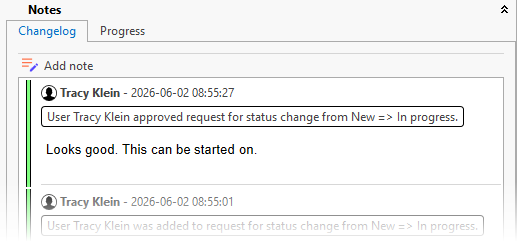
| Requests: Assignee comments now logged with approval/rejection entry | With the new client, an Assignee's comment is now included in the "approved/rejected" Notes entry in the Changelog instead of being logged separately.
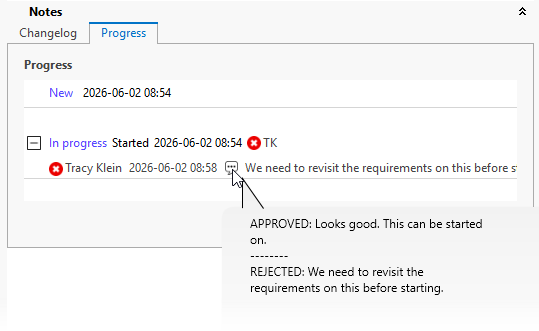
In addition, when viewing comments on the request Progress tab, you'll now see APPROVED/REJECTED headers for each comment should there be more than one.
Note that if older, compatible clients are used, the comment will continue to be logged in a separate note entry. | Improvement | 18088 | ||||||
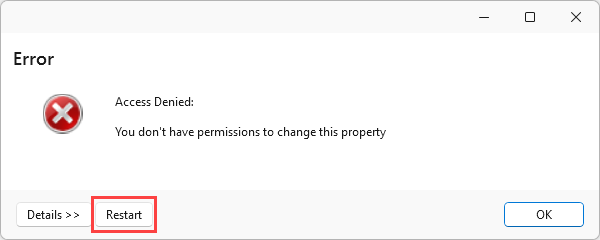
| Restart button on error dialogs | Error dialogs now offer a Restart button which, when clicked, will close the application and reopen it.
| Improvement | 23196 | ||||||
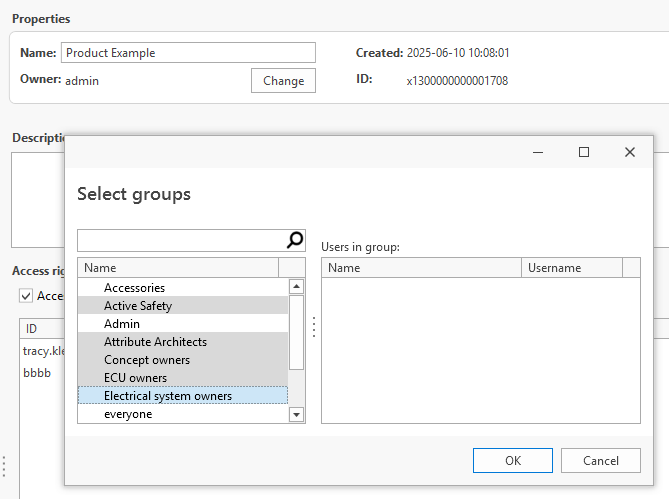
| Select groups: Multi-select performance improvement | Since our last release, we have improved the performance of multi-select in the Select groups dialog which is used, e.g., in Manage libraries.
| Improvement | 23372 | ||||||
| Select part types: Problem with dialog size when restored | This resolves a problem with the Select part types dialog when it is restored after being minimized. | Bug fix | 22912 | ||||||
| Select type: Filter maintained when clicking Include deprecated | We've made it so that any applied filter in the Select type dialog is maintained when the Include deprecated option is applied.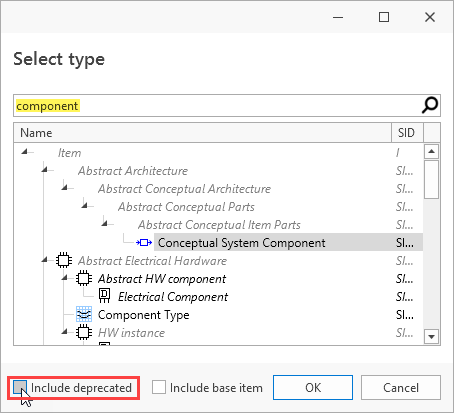 | Improvement | 23212 | ||||||
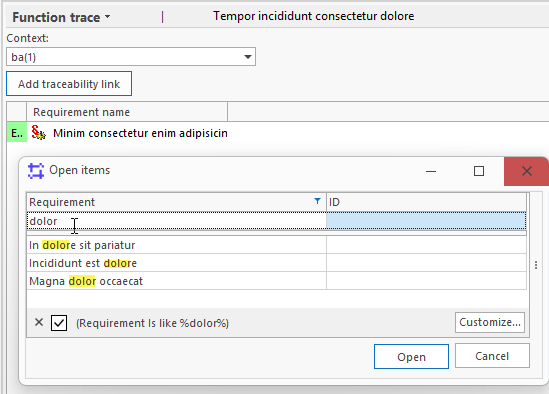
| Traceability Management: Improved filtering behavior | Also known as the RM+ Light View, the Traceability Management view includes a <Grid> configuration for the Open Item dialog used when adding traceability links. The filtering behavior in this dialog has been improved. Previously, filtering only returned matches when a value started with the entered filter text. The filter now performs a contains search, returning matches whenever the filter text appears anywhere within the value.
Note that it is case sensitive. | Improvement | 23353 | ||||||
| Trees/grids: Better viewing of RVF, Text, XML values | In views containing Grids or Trees, such as the Parts view, you can hover over attributes to view the entire value. This is especially helpful for multi-line values, such as RVF, Text and XML types.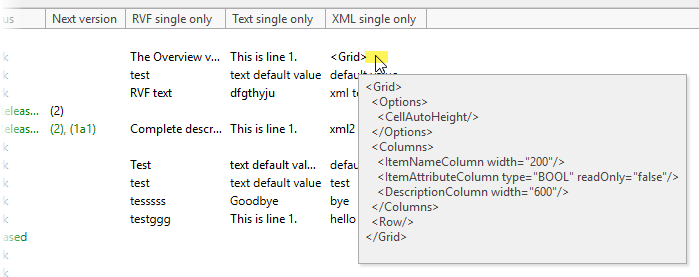 | Improvement | 22773 | ||||||
| Versions view: Longer version numbers appear truncated | The length of the Item version number has been increased so that it is now not truncated until it reaches 128 characters. Previously, it truncated at 10 characters. Versioning continues to work as expected. | Improvement | 23551 | ||||||
| Versions view: Problem when parts inherited from base item | This resolves an error "An item with the same key has already been added." in the view when parts are inherited from a Base item. | Bug fix | 23102 | ||||||
| WordImport: Method not found error | This resolves a "Method not found.." error thrown in the SWExtension.WordImport view. | Bug fix | 23637 |





Known issues
| Parts view | Support for export to CSV only. |
| Multiple versions view | Left-click on header row throws an error that can be ignored and does not affect functionality. |
| Attributes view: | It's not possible to use the Tab key to navigate in the Part attributes grid. You can, however, use the up/down arrow keys to navigate. |
Page tab in new SystemWeaver client | In the Dark theme, portions of the tab icons appear black on black. |
| Login and Projects | There is a scaling problem with the Login control and Project Issues view when using a display setting of 150% or higher. |