
This article describes the new features, improvements and fixes included in this release of SystemWeaver. When upgrading, we recommend that all client and server applications be upgraded as some bug fixes and/or enhancements require this.
These release notes are also available as a MS Word document, as well as a SystemWeaver XML file. Both are attached at the bottom of the article. You can also print out this article as a PDF using the Print option.
Note: Special attention should be given to the items highlighted in yellow as they will require additional planning/steps for your organization pre and/or post-upgrade if the view/tool affected is being used in your installation. |
API/Rest API/Extensions API Users
| Name | Description | Type | Issue ID |
| Optimization when running .NET Core API | When running the .NET Core API on Windows, RvfzToRtf now uses RVFUtility, matching the NET Framework implementation. As a result, descriptions are now fully retrieved on the initial request, eliminating additional server calls when viewing descriptions in the client. | Improvement | 22223 |
| DevExpress upgrade | We have upgraded the version of DevExpress used in the client applications to 25.1.7. | Improvement | 22326 |
Architects
| Name | Description | Type | Issue ID |
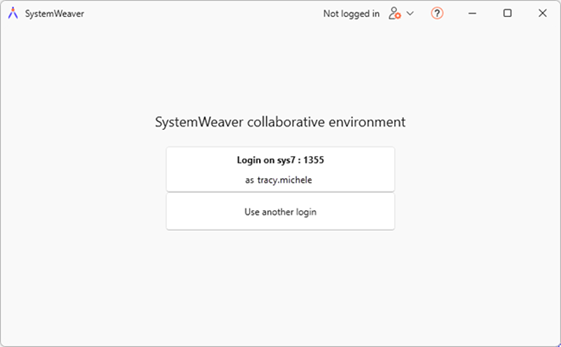
| Introducing new swArchitect client | As part of our ongoing roll-out of the next generation SystemWeaver client, this release includes a new version of the swArchitect client with several new general features outlined below. Planning System requirements for the new client: .NET 8 (Desktop Runtime) Login Upon opening the client the first time, new initial landing page:
It works as follows depending on how you most recently logged in:
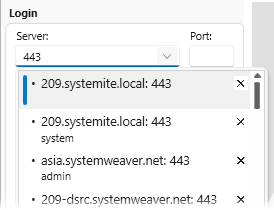
Filter login entries by server name or port
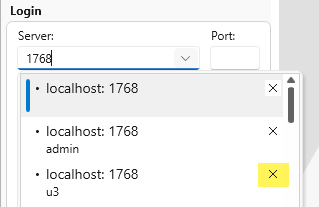
More visible tool for deleting unnecessary login entries
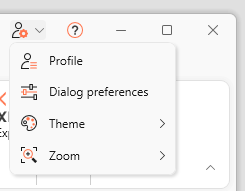
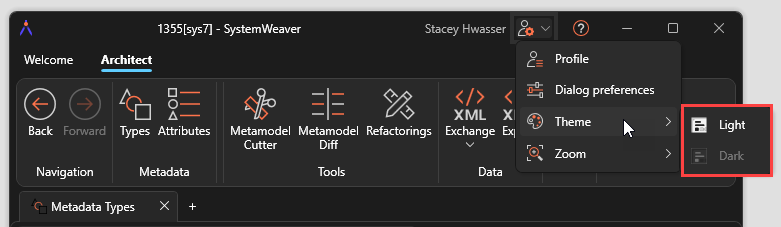
New User Settings menu added far right on the Title bar
Introduction of Dark theme
New zoom in/out tool 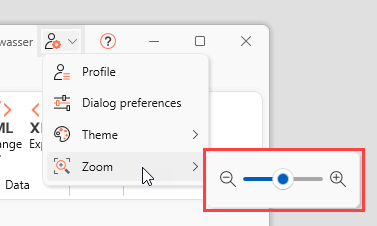 | New | |
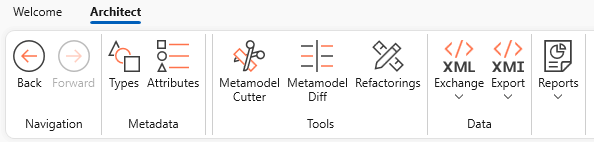
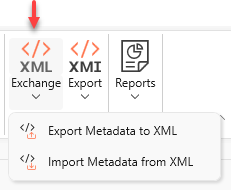
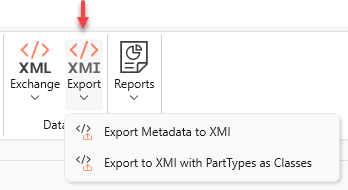
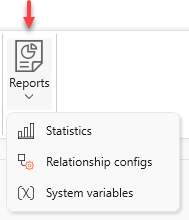
| New layout of swArchitect | The new swArchitect has a new layout of the functionality.
Metadata
Tools
Data
Reports
| New | |
| Charts: Improved support for path query and string array | There is improved support for path queries containing String array attributes in Configurable Charts. The attribute is now evaluated as an array in this view. ?> /IXRQ.Select(@STAR) Before: [, , 鱸劍櫋ッ鰐ꅳ郿栯ⁿ簄귈ኇ╇뛚堸퉶㬻᮵䰛䈈㌵楚ʎ긫ᬂ瀬㮏료壦ង䙽蒍뙊ﻡ놁㈦䎲銋臞ꃱ앜ೳ啧ቿ燧㒄뾍♄쁒葾树碣洭닮᱙횝ﶫꫤ밅禕ᣖ甫梪穫檎㧢흳㖪㱱앻ᏺ豱ᜈ褅䜼엞✦ꔓ㈤㪟庾굞�ꤗ駕ᎅᖰ귃縲艨䃍铩ₖ黫Ἡ⼇뗡㑱퓫즽ﺾ帣⏵봮⾆㝵�➖ꄅ稌] Now: Further support for more views and attribute types to follow in later releases. | Improvement | 22477 |
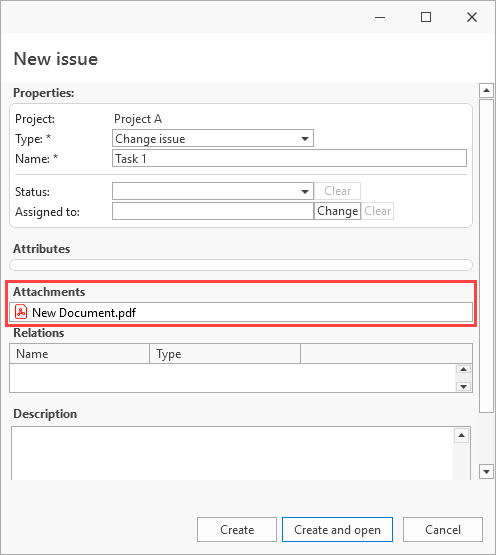
| Issue type: New default attachments feature | A new Default attachments feature allows CMS Project administrators to configure default attachments for one or more Issue Types in any Project they manage. Once the Default Attachments metadata is added to the database, the feature becomes available across all Projects and Issue Types. When enabled for use with an Issue Type, the configured default attachments are automatically copied to every new issue created of that type. File repository The feature requires the use of a file repository. Ensure disk space is sufficient. (https://support.systemweaver.se/en/support/solutions/folders/31000117154) Configuration The metadata for Default issue attachments must first be added to the database. This is done by an SystemWeaver Architect user by clicking the Create metadata button in Configure the explorer > Features. 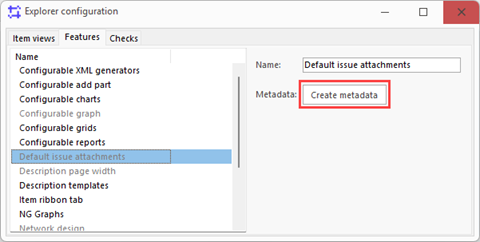 Or alternatively, by manually adding the needed Config item type to the metamodel: Item type=JDFA, Parent=Config Item Enabling default attachments for Issue Type Next, a user with "Change" access rights to the Project must enable the use of default attachments for the Issue Types where it is needed. This is done by navigating to Setup > Issue Types, selecting the Issue type and clicking Enable attachments on a new tab called Default attachments. 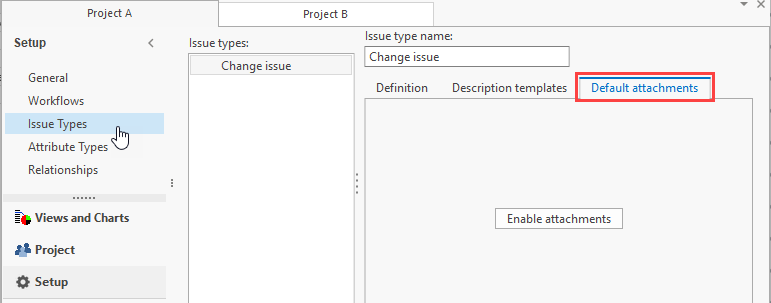 Adding default attachments to issue type Once enabled for an Issue type, CMS Project administrators with "Change" access can upload one or more default attachment files in the same way it is done in the Attachments view. 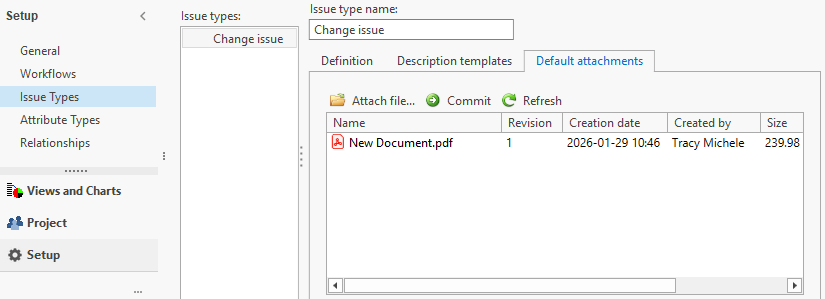 A copy of the attachment(s) are then added to each new issue of the given Issue type, and displayed read-only in the New issue dialog:
Once the issue is created, the attachments are handled as usual. | New | 22597 |
| Item type config: Problem with AllowStatusChange | This resolves a problem with the functionality of AllowStatusChange set in Item type configuration. | Bug fix | 22615 |
| Metamodel cutter: Plain text description now included in export | The plain text description is now included in the XML Export from the Metamodel cutter.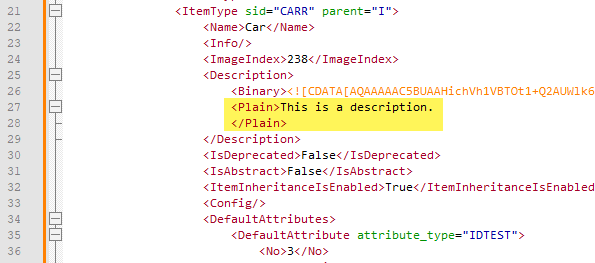 | Improvement | 22673 |
| New item: Addition of SID column | The list of item types in the New item dialog and page now includes the item type SIDs and supports filtering the list by Name or SID. 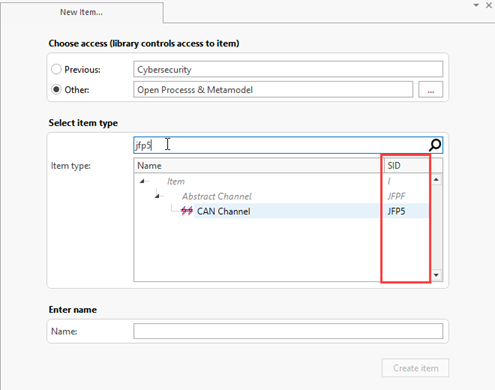 | Improvement | 16168 |
| Part type view: Description now formatted | In the Part type view, the Descriptions are now displayed in formatted text.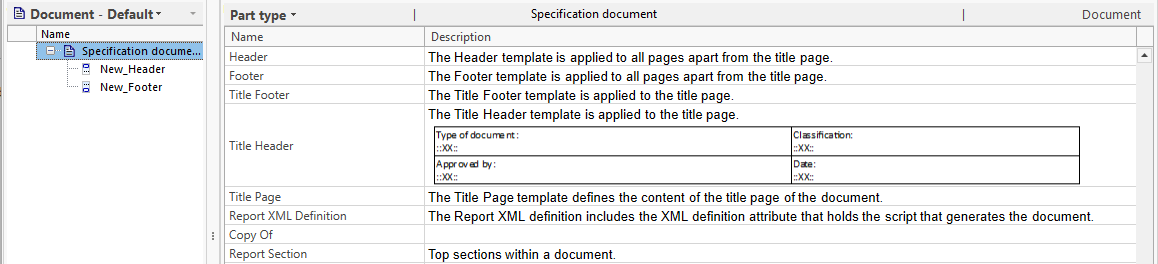 | Improvement | 21680 |
| Refactoring: Select attribute type dialog not filtered | The select attribute dialog presented for the Change identity prefix refactoring is now correctly filtered to show only Identity type attributes. | Bug fix | 22844 |
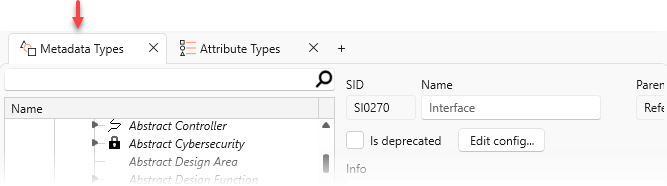
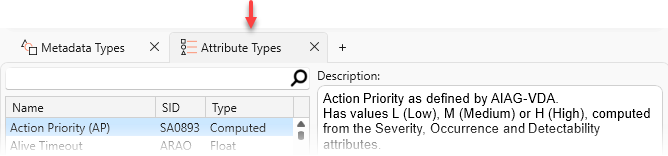
| swArchitect: Expand/collapse in Types tree | Expand and Collapse options are now provided in the Types structure tree. 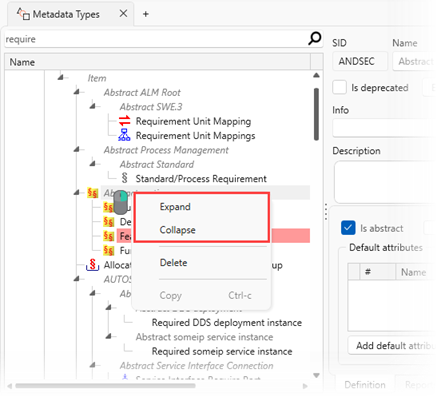 | Improvement | 22608 |
| swArchitect: Support for filtering attribute types | A filtering tool is now provided with the Attribute types list.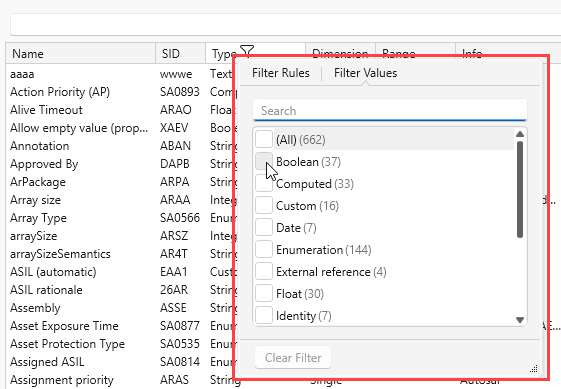 | Improvement | 22200 |
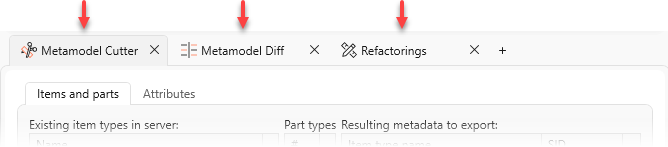
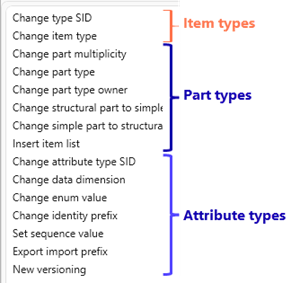
| swArchitect: Updates to Refactoring | We’ve reorganized the Refactorings list to group operations by the object they apply to, such as Item Type, Part Type, and Attribute Type.
In addition, there's now expanded support for viewing refactoring results without having to log out and log back in to the swArchitect to verify changes. | Improvement | 22671 |
IT Administrators
| Name | Description | Type | Issue ID |
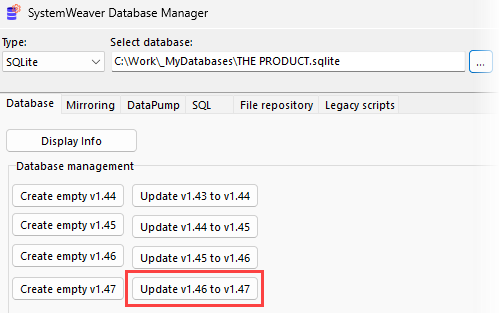
| Database version update | The database version identifies the version of the internal database schema used by SystemWeaver. With Skår (R51), the version has been upgraded from 1.46 to 1.47. This is a breaking change. System Administrators use the swDatabaseManager to update the database version. See Updating the Database Version.
Example upgrade from database version 1.46:
| Improvement | 22960 |
| Next generation server available | We're excited to introduce our next generation server with this release! We've benchmarked the next generation server against an array of databases of different shapes and sizes. Below are some highlights*: Significantly faster startup time In every single instance measured, we've reduced startup times by more than half on multi-core systems. For example, a database of ca. 45GB on disk went from a 31-minute startup time to 13 minutes. That's almost 60% less time! 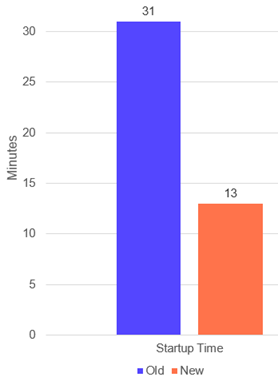 Significantly faster general search We've fundamentally reworked and optimized the filtering system, and many kinds of search queries are now hundreds or even thousands of times faster. They are so fast, in fact, that the new server's measurements are hard to even perceive in the graph below. We're talking searches now measured in microseconds that used to take whole seconds! There is still overhead from network data transfer etc to account for, so the greatest improvements will be experienced with searches that used to take a long time but returned few results, e.g. searching for a very specific item name in a very big database. 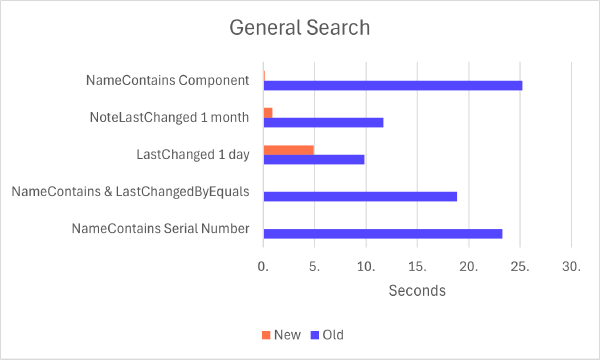 Faster loading of structure trees Loading structure trees is now a bit faster in general. The exact improvement experienced will depend on how many items, parts, and attributes are in the structure. 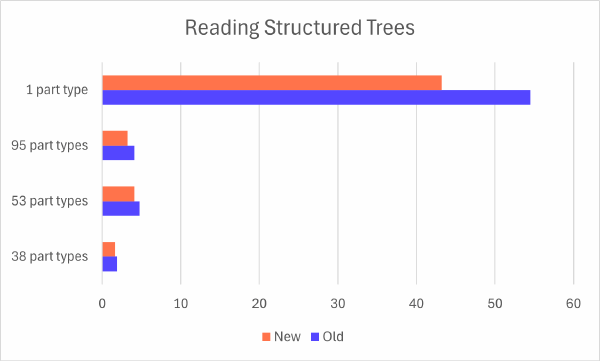 Faster write operations We see a significant improvement for removing items and creating new versions / branches of items with many parts and attributes. In the below example, the "NewVersion" procedure was about 4.3 times faster! The real breakthrough isn't just that this procedure is now faster, but that it scales better. Thanks to having improved the time complexity of the algorithm used, adding more parts or attributes to a versioned item will now have a much less explosive impact on performance. 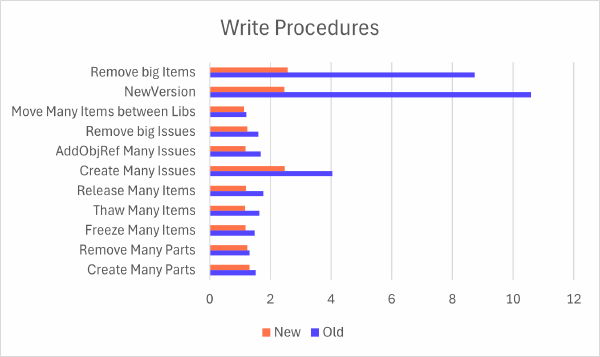 Improved SystemWeaver Path Language (SPath) The server runs SPath queries as before, but now it's faster, provides more explicit error messages, and includes an improved type checker. The example below illustrates the performance improvement using a recursive algorithm query. 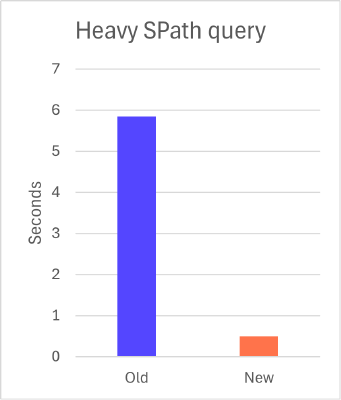 Want to try it out? If your organization would like to receive the next-generation server for a test environment, please include this with your upgrade package request to SystemWeaver Support. The next-generation server is optional in this release and will remain optional in release R52 (June 2026). The legacy server will be retired and no longer available starting with release R53 (October 2026). * Actual performance improvements may vary depending on database size and the structure and content of the data. | New | |
| Jira Cloud integration update | Due to updates to Jira application components and the Jira Rest API, changes needed to be made to our Jira integration with Jira Cloud so as to work properly. Jira Cloud now requires https URLs for integrated applications. Therefore, the configuration of the SystemWeaver.RestAPI now requires "requireHttps": true, and a certificate: { "SystemWeaver": { "restApiBaseURL": "localhost", "restApiPort": 9000, "requireHttps": true, "certificateSubjectName": "enter certificate subject name here", "systemWeaverHost": "localhost", "systemWeaverPort": 8888, "allowHttp2": true, "DomainName": "SYSTEMITE" }, .... This is a breaking change as without this, the SystemWeaver tab in the Jira web issue will not display SystemWeaver data. | Improvement | 22359 |
| Jira Data Center changes | Depending on Jira Data Center settings and version, users may be required to enter a valid API Token value in the Jira password field as well as check the Bearer authentication with PAT checkbox which has been added to the Select active Jira dialog in the view. These changes were required by Jira. Contact SystemWeaver Support if you are unsure about whether your version of Jira Data Center requires this.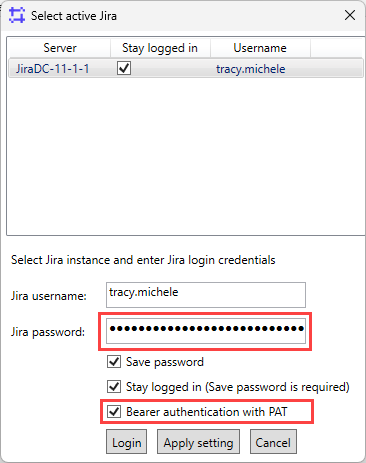 | Improvement | 21983 |
| Login: Option to hide Entra ID button | It is now possible to hide the "Signin with Microsoft" button for Entra ID authentication. To hide the button, simply remove the SystemWeaverEntraID.dll from the client installations prior to distributing them to users.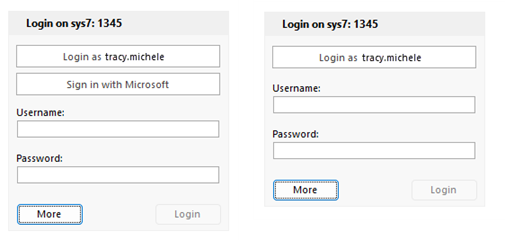 | Improvement | 22535 |
| Security improvements | This release includes security and stability improvements through a maintenance update of a third-party component. No functional changes are expected as part of this update. In addition, a number of code analysis warnings were resolved. | Improvement | 22204, 22326, 22516 |
| Server: Entry for long issue read calls in progress | Similar to what is already in place for General search for Items, there is now a 3-minute time limit on searches done against an entire project (QGetIssues) for improved user experience. It is very rare to come even close to the time limit. If it happens, it is almost always not the user's intended/needed search. Setting the limit minimizes the effect these searches have on other users' ability to work. Should one of these searches reach the new time limit, the user will receive the following message:
The user can then refine their search by adding additional criteria, e.g., Reporter, Assigned to, Issue type, etc. Server administrators or project managers can find instances of long QGetIssues searches in the swServer.log if they wish to use the opportunity to provide suggestions for refining the search.
| Improvement | 22314 |
| Server: Filter captured earlier for long call in progress | Previously for long-running General searches (i.e., searches done against the entire database, as opposed to in a specific item structure or view), the search filter was provided in the swServer.log when the search was terminated due to it reaching the 3-minute time limit. This has been changed so that the filter is now logged with the first "Long call in progress" entry in the swServer. log. This information can be useful when fielding reports of slowness, and can help you avoid unnecessary server restarts.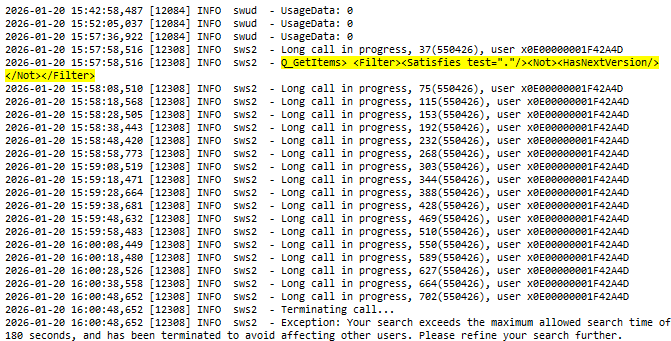 | Improvement | 22314 |
| Server: Improvement to mirror performance | Mirror server users will experience better performance as mirrors now handle more traffic directly instead of forwarding requests to the main server. 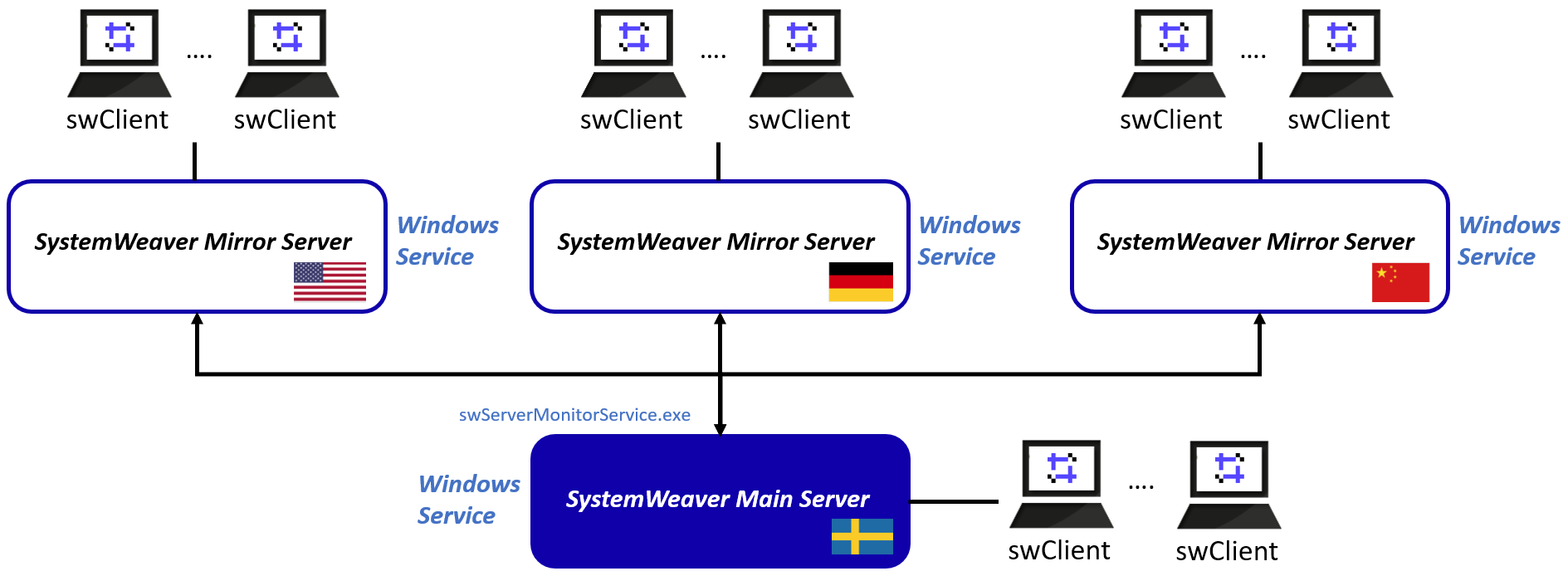 | Improvement | |
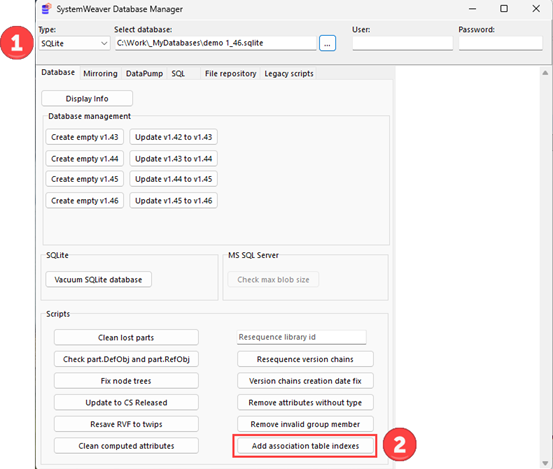
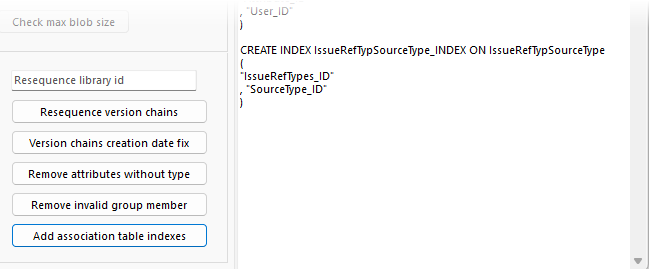
| Server: Performance improved for object removal | Some optimization has been done related to the removal of objects having attributes. One example is when you are deleting an item structure with many parts. By upgrading to Skår (R51), you will receive this optimization automatically. No additional steps are needed. You will also get the optimization when using the updated swDatabaseManager for creating both a new 1.46 database file and a new 1.47 database file. To obtain the improvement without upgrading, you can run a new script provided in the swDatabaseManager which we strongly recommend. Runtime is a few minutes. To run the script without upgrading to R51:
Log window upon script completion:
| Improvement | 22421 |
| Statistics Log: Addition of item changed library | The Statistics log can now include a log of when an item is moved from a library to another. The call type is named "ChangeLibrary".
{ "time":"2026-01-20 14:28:13.0092", "seqId":"183", "sessionId":"8", "ip":"127.0.0.1", "userId":"x0E0000000000A8C0", "username":"tracy.klein", "email": "tracy@company.com", "call":{ "type":"ChangeLibrary", "item":"x040000000001673B", "fromLibrary":"x13000000000085A7", "toLibrary":"x1300000000014021" } } To include this with your upgrade:
<attribute name='fromLibrary' layout='${event-properties:call.fromLibrary}' /> <attribute name='toLibrary' layout='${event-properties:call.toLibrary}' /> 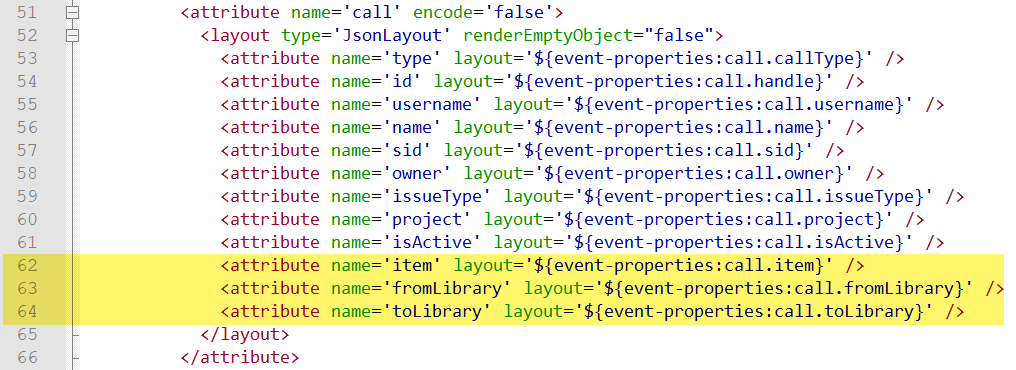 Again, no need to do this on the mirror server(s). Again, no need to do this on the mirror server(s). | Improvement | 22815 |
| Statistics log: Addition of Project to IssueViewLoaded | The Statistics log can now include the project's Name for IssueViewLoaded entries. Before: { "time": "2025-11-26 12:01:51.8677", "seqId": "0", "sessionId": "1", "ip": "127.0.0.1", "userId": "x0E00000000000009", "username": "john", "email": "john@company.com", "action": { "type": "IssueViewLoaded", "view": "Open bugs", "loadTime": "00:00:00.007" } } Now: { "time": "2025-11-26 12:01:51.8677", "seqId": "0", "sessionId": "1", "ip": "127.0.0.1", "userId": "x0E00000000000009", "username": "john", "email": "john@company.com", "action": { "project": "Global Requests", "type": "IssueViewLoaded", "view": "Open bugs", "loadTime": "00:00:00.007" } } | Improvement | 16757 |


Users
| Name | Description | Type | Issue ID |
| About tab: Scaling issue causing text to be cut off | This resolves a problem where text on the About tab is sometimes not visible due to a scaling issue. | Bug fix | 19000 |
| Add note: OK button is disabled | We recently fixed the OK button being disabled in the Add (item) note dialog. | Bug fix | 22534 |
| All references: Object reference errors | This resolves object reference errors when, e.g., interacting with the vertical scrollbar and the right-click header context menu. | Bug fix | |
| All references: Support for Ctrl+A and multi-select | We have recently added support for Select all (Ctrl+A) and multi-select in the All references view. 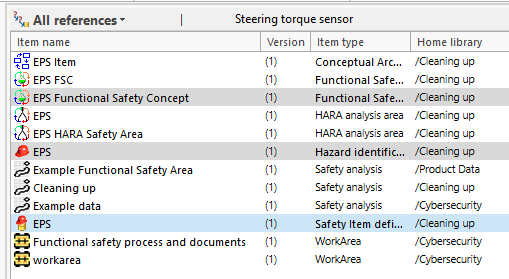 | Improvement | 21875 |
| Complete status: Owner now immediately refreshed | Changes to an Item Owner now display immediately in the Complate status view for all clients. 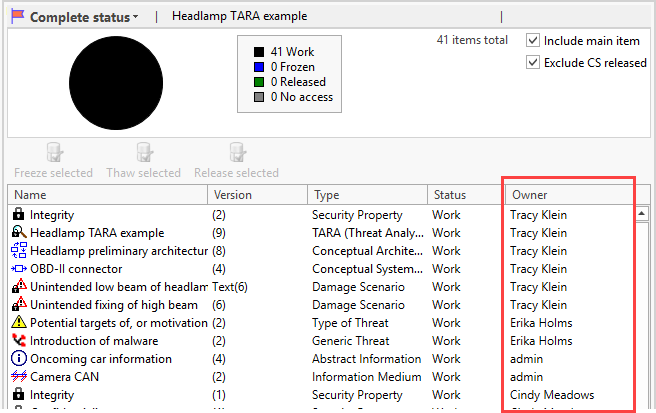 | Improvement | 20521 |
| Configurable grid: Access violation upon Select search results | This resolves an access violation error in the Configurable Grid view when using Select search results. | Bug fix | 22856 |
| Delete issue: List index out of bounds error | This resolves a List index out of bounds error that sometimes is thrown when deleting an issue. | Bug fix | 22858 |
| FMEA grid: Problem with description in new item dialog | This resolves a problem where content entered in the embedded Description field of the New Item dialog did not appear when the description editor was opened in the dialog. | Bug fix | 22496 |
| Issue attachments: Cannot create file message | This resolves a case of a "cannot create file" message when opening an attachment linked to an issue. | Bug fix | 15567 |
| Issue editor: Cannot marshal error | This resolves a "Cannot marshal: Encountered unmappable character" error when viewing an issue given specific characters. | Bug fix | 22192 |
| Libraries: Redirect to library on Manage libraries page | This fixes an issue where switching from the Libraries view to the Manage Libraries page failed to redirect you to the library you had selected. | Bug fix | 21285 |
| Missing scrollbars in Description | This addresses missing scrollbars for Description in a number of locations in the client. | Bug fix | 22382 |
| New issue dialog: Deprecated status is showing | This resolves a problem with a deprecated Issue status still displaying in the New issue dialog. | Bug fix | 22247 |
| New item: Clarification of choose access rights | When creating a new item, we've updated the labels in the UI to clarify that the access right to the item is determined by the library that is chosen.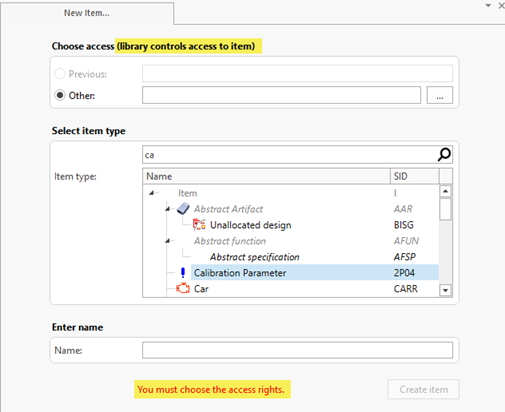 | Improvement | 22352 |
| Occurrence matrix: Collection error | This resolves a "Collection error" intermittantly thrown when using multi-select together with filter by "No occurrences". | Bug fix | 22682 |
| Occurrence matrix: Enum attribute improvements | The following improvements have been made in the Occurrence matrix view for Enumeration attributes: Any enum value colors and descriptions are now shown in the drop-down list. 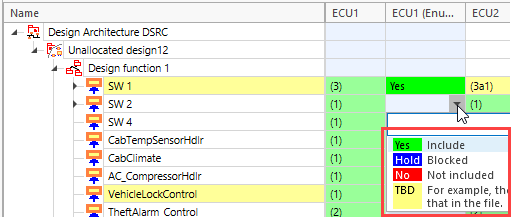 A filter tool enables you to find hits anywhere in the values. 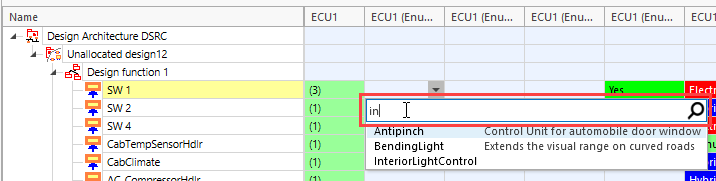 | Improvement | 22097, 22202 |
| Occurrence matrix: Improved performance | We recently made a significant performance improvement in the Occurrence matrix view decreasing the initial view loading time by 50-80%. Example: Matrix with 334 columns, 1252 rows, one attribute column: Before: 12.00 sec Now: 3.00 sec What is the Occurrence matrix? Generic and flexible view that presents a matrix of rows of items to be managed, and columns of items that can include the row items as parts, or "occurrences", of the row items.
Note: For dropdown attribute editors, the dropdown arrow currently is not shown. | Improvement | 20726 |
| Optimized check of user permissions | Permission checks used for filtering and access control across client views and dialogs have been optimized. One example is in the select library dialog: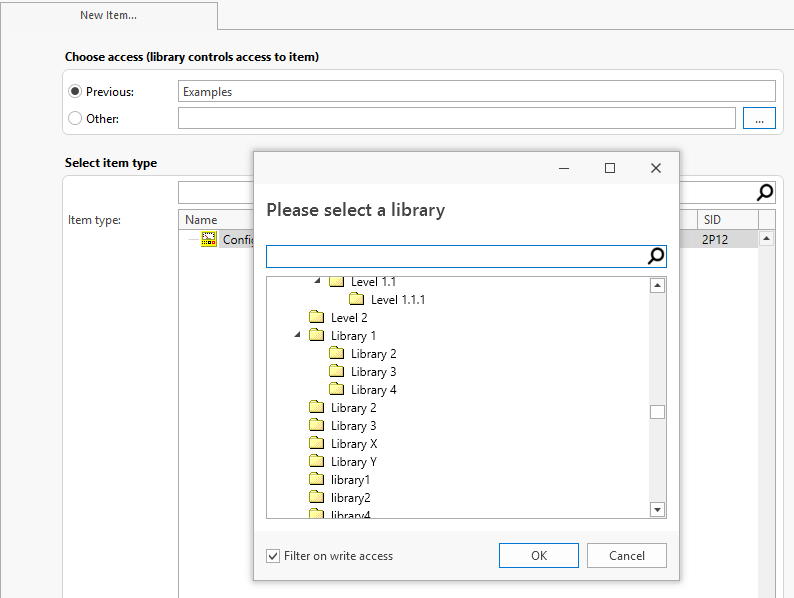 | Improvement | 20728 |
| Project: Error upon add group to users list | This resolves an error that appears when clicking on Add group on a project's Users page. | Bug fix | 22894 |
| PDF printing: Further improvements for bookmarks | This resolves an "index out of range" error as well as bookmark sorting and hierarchy problems. | Bug fix | 22393, 22437 |
| Reintroduce Select All (Ctrl+A) | We have reintroduced support for clicking anywhere on a row and doing Ctrl+A to select all rows in the Complete status and References views. | Bug fix | 20824 |
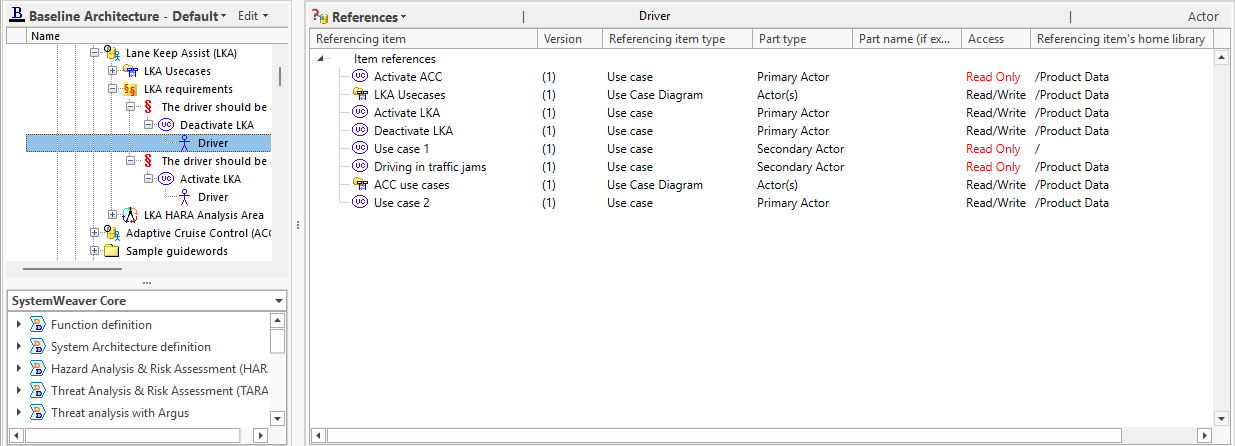
References: Optimized loading | The initial loading of the References view is significantly faster now when working with items with many references. Examples (in seconds): An item with 675 references >> ~40% faster An item with 1077 references >> ~68% faster An item with 1032 references >> ~85% faster
| Improvement | |
| References: Missing multi-select | This fixes a recent problem where multi-select was not working as expected in the References view. | Bug fix | 21718 |
| Select library: Support for Collapse/Expand | The Select library dialog now provides Expand and Collapse options.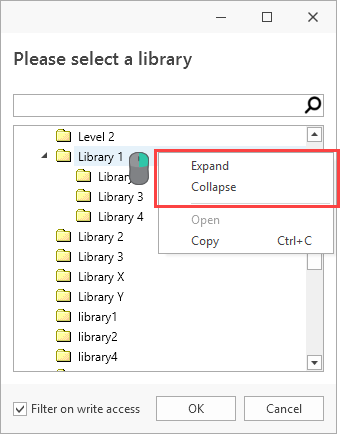 | Improvement | 21448 |
| Select user(s) dialog: Easier filter and apply | When filtering in the Select user(s) dialog, it's possible to apply the first hit by simply hitting the Enter key. This is especially useful when there is only one value matching your filter.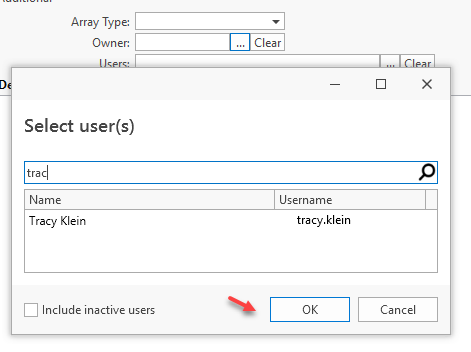 | Improvement | 22165 |
| User options: Display of account access level | The User account options, found under File>Options, now includes the display of the current user's access rights (Read/Write or Read-Only) 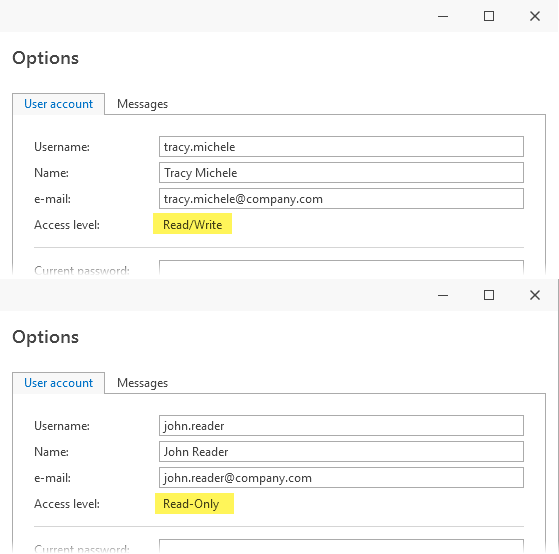 | Improvement | 17172 |
| Variability matrix: Errors when loading the view | This resolves a "Multiple CallServerConnection is avoided" error as well as Access violation" errors intermittantly thrown when loading the view. | Bug fix | 17211, 19099, 20494, 22630 |
| Variability matrix: Improved performance | The Matrix for Working with Variant Models view now loads >50% faster than before for a significant improvement when working with larger matrices. 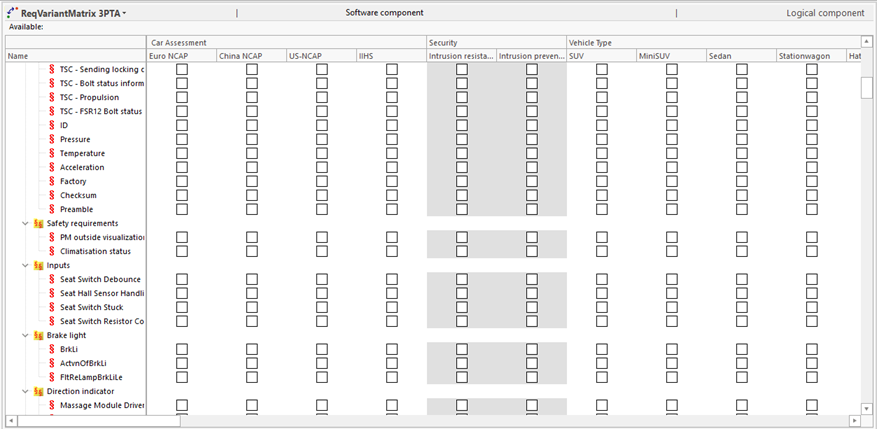 | Improvement | |
| Versions view: Assertion failure with no-access versions | This resolves an error loading the Versions view when there are versions to which the user has no access. | Bug fix | 19960 |
| Versions view: Restricted attributes display and are editable | This resolves the problem of an attribute type set as restricted still displaying in the Versions view. | Bug fix | 14906 |
Known issues
| swArchitect client |
|
| Occurrence matrix |
|