
This article provides some resolutions to application errors. For login problems, see Troubleshooting Login Problems
- I am getting an Out of Memory error.
- I cannot work in swExplorer.
- I receive an error when trying to clone a structure.
- I receive an error when trying to export to Excel.
- I receive an error when trying to save a manual layout of a graph.
- I receive an error when I log in.
- My client crashes every time I try to load a specific dialog.
- My client crashes every time I try to load a specific view.
I am getting an Out of Memory error.
Error message
EOutOfMemory. Out of memory.

Resolution:

Things To Help Avoid Exceeding the Memory:
We advise that you try the following solutions.
- If trying to open a large item structure tree,
- Does the structure display 10s or 100s of thousands of items? If possible, open a smaller context of the tree, and then perform your work
- Are Description references turned on in the structure tree? If so, turn them off. Example:

- If, when logging in, the client immediately lands on an open Page that contains a large structure throwing Out of Memory, you will need to log in with a new session.
- Do you have any other tabs open, specifically ones with very large structures loaded? Try closing them.
- Are there many other applications running simultaneously on the laptop? Try closing them.
- Are you working in Citrix? If so, have your IT department ensure that there is at least 4 GB RAM for each use of the client.
- If the out of memory occurs when trying to Add a part in a structure, try copying the part you want to add from another structure where it is in use, and using Paste as... to add it to your structure.
I cannot work in swExplorer.
Error message
Your client is irreversibly out of sync with server. Please restart client. (3469869,3937104)
Resolution
The client application has gotten too far behind in receiving events from the server. Close the client application and log in again.
I receive an error when trying to clone a structure.
Error message
Your database installation no longer supports this action. TswIItem.AddPart: Invalid def obj: XXXX expected: XXXX.
Resolution
The error is likely caused by a configuration or meta model issue. A SW Architect should investigate the invalid meta model element indicated in the error message.
I receive an error when trying to export to Excel.
Error message
The maximum length of cell contents (text) is 32,767 characters.
Resolution
This error message has to do with Excel limitations. There's a hard limit in both the . xls and . xlsx file formats of 32,767 characters in a cell. I Contact a SystemWeaver architect to discuss how to resolve the data problem.
I receive an error when trying to save a manual layout of a graph.
Error message
Exception message: Unknown note type: NGML.
Resolution
This error indicates that a type with SID NGML is not found in the database. This note type is needed for manual layout to work. To resolve the error, a SystemWeaver Architect should ensure that the metadata for Configurable graph is installed.
I receive an error when I log in.
Error message
Exception Report: Object with id 'XXXXXXXXXX' not found
Resolution
This message can be caused by having an item, that no longer exists in the database, in an open tab in the client. It can also be caused by having a shortcut on the Items ribbon to an item that no longer exists in the database. These are example cases of when the client has an ID for something that no longer exists. The client will continue to work so no action is required. To stop the error from returning, one needs to determine the case and resolve it.
We frequently get this message in the log, and on the status bar of the client.
Error message
Avoiding resetting part owner to wrongly created item.
Resolution
This message can be disregarded. It is there for Systemite's informational and troubleshooting purposes only, as needed.
My client crashes every time I try to load a specific dialog.
Error message
No error provided in the client.
Resolution
Check with your IT department. A client application can crash due to antivirus (AV) injection. Most modern antivirus and endpoint security products inject DLLs or hook system APIs into running processes to monitor behavior. While this is usually safe, it can cause crashes in certain scenarios.
My client crashes every time I try to load a specific view.
Error message
No error provided in the client.
Resolution
A client application can crash if a file is blocked because it came from another computer. Right-click a file in your client installation, e.g., swExplorer.exe, RVFUtility.dll, etc. → Properties
If you see: “This file came from another computer and might be blocked…”, unblock all of the files in your client installation and confirm if this resolves the problem.
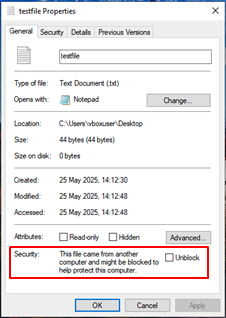
You do complete this operation on all files in a directory as well.
- Open Windows PowerShell in the diectory.
- Run: Get-ChildItem -Recurse | Unblock-File