The SystemWeaver database version gets updated from time to time. When it does, we'll announce this in our release notes. SystemWeaver databases can still exchange data even if they are on different versions, e.g., 1.44 vs 1.45. There is no difference in the SW XML format between them. See Software Releases with Client API and Database Versions for a list of SystemWeaver releases with their respective database version. This article describes how to verify the version of a SystemWeaver database.
Prerequisites
- A SystemWeaver swDatabaseManager utility tool compatible with your version.
- The server is not running.
| Note: The swDatabaseManager application is not for general distribution and should only be used by an authorized system administrator. |
To check the version at any time (you do not need sole access to the database to do this), select the Type of database you are using and enter the database information.
R53 and later releases: You can enter the database information manually or use the Load config button to load it from an existing swServer.ini file that contains the database information in the DNS= entry. See DSN in Installing a New SystemWeaver Server for the format to use by database type.
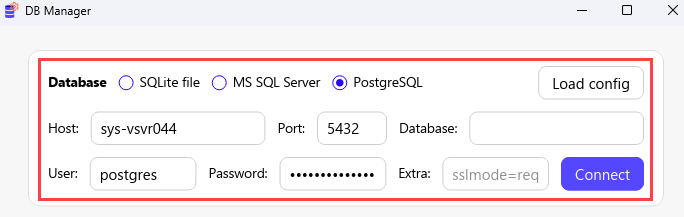
R52 and earlier releases: Enter the information manually.

Verifying Current Database Version
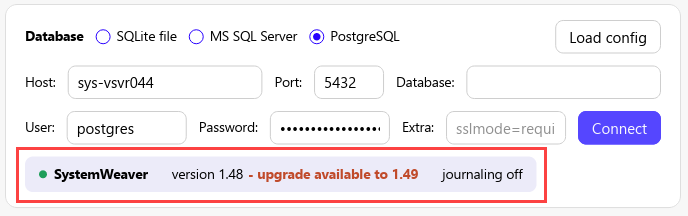
R53 and later releases: The current database version will be displayed, along with a notification that an upgrade is available.
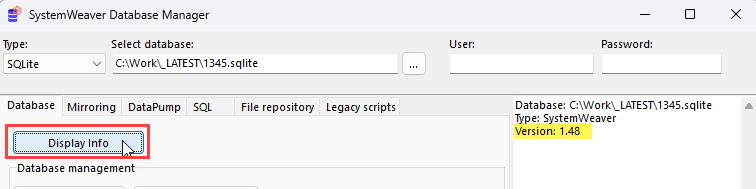
R52 and earlier releases: Click Display info to confirm the current version of your database. The version will display in the log window to the right. In the below example, the database version is 1.48.