
This article describes how to configure the SystemWeaver MCP Server's App settings.
- Create the Configuration File
- Configure the Operational Settings
- Optional: Debug Override for Troubleshooting
- What's Next?
Create the Configuration File
- Copy the example configuration file in the SystemWeaverMCP folder and rename the copy by removing '.example':
appsettings.example.json → appsettings.json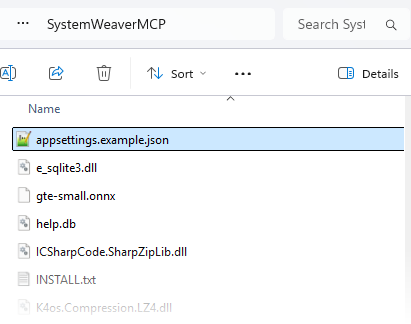
- Place appsettings.json in the same directory as SystemWeaverMCP.dll (the SystemWeaverMCP folder). The server reads this file from this directory containing SystemWeaverMCP.dll.
{
  "_comment": "SystemWeaverMCP example configuration (4.0.0, ToolLayer on SystemWeaver API 1.55). Operational settings only: the broker connection is provisioned with SystemWeaverMCP.CredentialTool or SYSTEMWEAVER_SystemWeaver__* environment variables. Tool visibility AND callability are gated per capability axis via ToolAxes below (fail-closed: a disabled axis is hidden from tools/list and refused on call). The tools on each axis are listed in docs/tools.md.",
  "SystemWeaver": {
    "_comment": "Connection identity is NOT configured here — ServerHost/ServerPort/AuthenticationMethod/LoginName/Password/Domain/ServerNetworkId are provisioned via the companion GUI tool into the DPAPI-protected store (%APPDATA%/SystemWeaverMCP/credentials.dat) and read from there. For DEBUGGING, any of these can be overridden per field with a SYSTEMWEAVER_ environment variable (e.g. SYSTEMWEAVER_SystemWeaver__ServerHost), which takes precedence over the store for that field. Only the operational options below (proxy, timeouts, target library) are normally pinned in this file.",
    "UseProxy": false,
    "ProxyHost": null,
    "ProxyPort": 0,
    "ProxyLoginName": null,
    "ProxyType": "None",
    "ConnectionTimeoutSeconds": 30,
    "BrokerOperationTimeoutSeconds": 120,
    "TargetLibrary": null
  },
  "ToolAxes": {
    "_comment": "Per-capability-axis enablement. A disabled axis is hidden from tools/list and refused on call (fail-closed). Defaults when omitted: all read axes on; every write axis off. Enable a write axis explicitly to allow that mutation surface. VersionWrite contains the irreversible release transition — keep it off unless required.",
    "Navigate": { "Enabled": true },
    "Read": { "Enabled": true },
    "Describe": { "Enabled": true },
    "ItemWrite": { "Enabled": false },
    "ConfigRead": { "Enabled": true },
    "AppConfigWrite": { "Enabled": false },
    "ConfigItemWrite": { "Enabled": false },
    "IssueRead": { "Enabled": true },
    "IssueWrite": { "Enabled": false },
    "VersionRead": { "Enabled": true },
    "VersionWrite": { "Enabled": false }
  },
  "BulkLimits": {
    "_comment": "Per-call batch caps, default 100 each: MaxItemsPerCall (sw_create_items), MaxPartsPerCall (sw_create_parts), MaxUpdatesPerCall (sw_update_items and sw_set_part_attributes), MaxDeletesPerCall (sw_delete_items), MaxDeletePartsPerCall (sw_delete_parts). Omitted caps keep their default.",
    "MaxItemsPerCall": 100,
    "MaxPartsPerCall": 100
  },
  "ReadSurfaceLimits": {
    "_comment": "Ceilings on what a read or navigate RESPONSE may carry. These are the only outbound bounds in the layer — Transport.MaxMessageBytes bounds inbound messages only. They live together because they answer one question: how much a response may cost the caller that has to hold it. Raise them on a large-context model, lower them on a constrained one. MaxWalkNodes: exceeding it REFUSES the walk and reports the true count — it never truncates; ask sw_walk for summary=true instead. Default 500, matching the cap sw_find already applies. MaxDescriptionChars / MaxAttributeValueChars are DEFAULTS only: a caller may override per call, or ask for the value whole with description_full / attribute_values_full / value_full. MaxIssueFindResults: the default sw_issue_find result cap, overridden per call by limit; a cut result reports truncated. MaxContentReadHandles: how many handles one sw_read may name; a call naming more is REFUSED whole and nothing is read. Default 50; must be positive.",
    "MaxWalkNodes": 500,
    "MaxDescriptionChars": 2000,
    "MaxAttributeValueChars": 1000,
    "MaxIssueFindResults": 1000,
    "MaxContentReadHandles": 50
  },
  "Help": {
    "_comment": "Offline Help plugin (sw_help_search / sw_help_read) over the bundled per-release corpus (help.db) + gte-small ONNX model, shipped In-Package and copied beside the server. Tools run on the Read axis (so they also honour ToolAxes:Read). Enabled by default. Set Enabled=false to hide sw_help_*. CorpusDirectory optionally overrides where help.db + gte-small.onnx are loaded from (default: beside the server assembly).",
    "Enabled": true,
    "CorpusDirectory": null
  },
  "Transport": {
    "_comment": "Stdio transport limits. MaxMessageBytes bounds a single inbound newline-delimited JSON-RPC message (≈ bytes for ASCII/JSON); an oversized message is rejected with a JSON-RPC error and the loop keeps serving. Defaults to 1048576 (1 MiB).",
    "MaxMessageBytes": 1048576
  },
  "Logging": {
    "_comment": "This section GOVERNS the level: set it here, or through SYSTEMWEAVER_Logging__LogLevel__Default, and the server emits accordingly.",
    "LogLevel": {
      "Default": "Information",
      "SystemWeaverMCP": "Debug"
    },
    "File": {
      "_comment": "Log records go to a FILE and nowhere else -- never to stdout, which carries the JSON-RPC protocol and would be corrupted by a stray line, and no longer to stderr, which the host that launches this server discards. Leave Path empty for the default, %APPDATA%\\SystemWeaverMCP\\logs\\mcp.log, beside the credential store. Set Path to write elsewhere. Either way the server inserts -yyyyMMdd before the extension, so files roll daily. RetentionDays is how many days of those files are kept: older ones are deleted at startup and when the day rolls, judged by the date in the file name, and no other file in the folder is touched. 14 by default; 0 keeps every file.",
      "Path": "",
      "RetentionDays": 14
    }
  }
}
Configure the Operational Settings
The connection identity is intentionally not stored in this file. It is stored separately in the encrypted credential store configured in Getting Started with the SystemWeaver MCP Server.
The appsettings.json file contains operational settings only:
SystemWeaver: Proxy
Configures the proxy (UseProxy, ProxyHost, ProxyPort, and ProxyType), ConnectionTimeoutSeconds, BrokerOperationTimeoutSeconds, and the optional TargetLibrary setting (which pins the server to a specific library).
ToolAxes: Tool Enablement
Controls which tool capabilities are available. The configuration is fail-closed: a disabled capability is hidden from tools/list and refused if called directly.
By default, all READ capabilities are enabled and all WRITE capabilities are disabled.
| Capability | Type | Default |
|---|---|---|
| Navigate | Read | On |
| Read | Read | On |
| Describe | Read | On |
| ConfigRead | Read | On |
| IssueRead | Read | On |
| VersionRead | Read | On |
| ItemWrite | Write | Off |
| AppConfigWrite | Write | Off |
| ConfigItemWrite | Write | Off |
| IssueWrite | Write | Off |
| VersionWrite | Write | Off |
Enable a write capability explicitly only when its operations are required. Keep VersionWrite disabled unless versioning writes are specifically needed. It includes the release transition, which cannot be undone.
BulkLimits: Batch Operation Limits
Sets the maximum number of operations permitted per call. Default is 100 for each.
| Setting | Applies to |
|---|---|
| MaxItemsPerCall | sw_create_items |
| MaxPartsPerCall | sw_create_parts |
| MaxUpdatesPerCall | sw_update_items and sw_set_part_attributes |
| MaxDeletesPerCall | sw_delete_items |
| MaxDeletePartsPerCall | sw_delete_parts |
ReadSurfaceLimits: Read Eesponse Limits
Ceilings on what one read response may carry.
| Setting | Default | Description |
|---|---|---|
| MaxWalkNodes | 500 | Maximum number of nodes in sw_walk. Requests exceeding this limit are refused, and the actual node count is reported. Results are never silently truncated. |
| MaxDescriptionChars | 2000 | Callers can override this limit per call. |
| MaxAttributeValueChars | 1000 | Callers can override this limit per call. |
| MaxIssueFindResults | 1000 | Maximum number of results returned by sw_issue_find. |
DescriptionImageLimits: Image and Rich-text Limits
These settings control image and rich-text sizes. They are validated at startup. If a value is outside its permitted range or is not a whole number, the server exits with code 1 and writes an error message to stderr identifying the setting and its valid range. Values are never silently clamped.
| Setting | Valid range | Behavior |
|---|---|---|
| ImageSizeThreshold | 1–100000 bytes | Images smaller than the threshold remain embedded in the description; larger images are stored in the file repository. |
| MaxImageBytes | 1–3000000 bytes | Maximum image size. |
| MaxPayloadBytes | 1–196607 bytes | Maximum compressed description size. |
| MaxRichTextAttributeBytes | 1–524287 bytes | Maximum compressed rich-text attribute size. |
| SupportedImageSuffixes | bmp, png, jpg, jpeg | Supported image file extensions. A configured list replaces the default list. |
The example configuration included with the MCP Server sets ImageSizeThreshold to 32000 bytes. If the setting is absent, the compiled default is 1 byte.
Important image handling considerations:
- An embedded image cannot be read back as a picture, and subsequent edits can cause them to be lost.
- Set ImageSizeThreshold to 1 to store every image in the file repository, or have the agent pass force_repository_images to sw_update_description.
- The defaults for MaxImageBytes, MaxPayloadBytes, and MaxRichTextAttributeBytes match the server's own limits.
- A configured list REPLACES the default. Configure SupportedImageSuffixes as either a single value or a list using indexed keys such as SupportedImageSuffixes:0 and SupportedImageSuffixes:1. A single value and a list cannot be configured simultaneously, regardless of their sources, such as the configuration file and an environment variable. In this case, the server refuses to start.
- The --test mode checks the broker connection only. It does not validate this section.
LocalFiles: File Access Restrictions
Root defines the only directory the file tools are allowed to read from or write to. It applies to:
- sw_attachment_add
- sw_attachment_download
- sw_fetch_description_image
- sw_update_description when using images_to_add
Paths outside it are rejected after symbolic links and junctions have been resolved.
The default root is %APPDATA%\SystemWeaverMCP\files. Environment variable placeholders such as %APPDATA% are expanded. In JSON, backslashes must be escaped by doubling them.
The folder is created at startup if it does not exist. If a placeholder cannot be resolved, the path is relative, or the folder cannot be created, the server stops with exit code 1 and writes an error identifying LocalFiles:Root to stderr.
You can override at launch using the SYSTEMWEAVER_LocalFiles__Root environment variable.
The legacy SWMCP_ATTACHMENTS_ROOT environment variable is no longer supported.
Help: Offline Help Tools
Controls the sw_help_search and sw_help_read tools. These tools are enabled by default and use the bundled help corpus without requiring a network connection. Set Enabled to false to disable them.
Transport: Message Size Limit
MaxMessageBytes sets the maximum size of a single inbound JSON-RPC message. The default is 1 MiB.
Logging: Log Configuration
Configures log levels and the log file path using Logging:File:Path. Logs are written to a file only, never to stdout (reserved for the MCP protocol) or stderr.
The default log file is %APPDATA%\SystemWeaverMCP\logs\mcp.log. Log files are rolled daily, using the date suffix -yyyyMMdd.
Logging:File:RetentionDays controls how long log files are retained:
- Default: 14 days.
- 0: Retain all log files indefinitely.
- Values above 36500 are treated as 36500.
Older log files belonging to this server are deleted at startup and when the log date rolls over.
Optional: Debug Override for Troubleshooting
For troubleshooting, you can override individual connection fields using SYSTEMWEAVER_ environment variables. An environment variable takes precedence over the encrypted credential store for that field only. For example:
SYSTEMWEAVER_SystemWeaver__ServerHost=other-broker.local
This is a debugging escape hatch. Under normal operation, the server uses the encrypted credential store.
Security recommendation: Do not put real passwords in launcher configuration or environment variables in production.
What's Next?
Register the server with your AI host. Complete instructions can also be found in INSTALL.txt included with the MCP Server.